ginger's thoughts

Silvia's blog

Tag: video

Use deck.js as a remote presentation tool

deck.js is one of the new HTML5-based presentation tools. It’s simple to use, in particular for your basic, every-day presentation needs. You can also create more complex slides with animations etc. if you know your HTML and CSS.

Yesterday at linux.conf.au (LCA), I gave a presentation using deck.js. But I didn’t give it from the lectern in the room in Perth where LCA is being held - instead I gave it from the comfort of my home office at the other end of the country.

I used my laptop with in-built webcam and my Chrome browser to give this presentation. Beforehand, I had uploaded the presentation to a Web server and shared the link with the organiser of my speaker track, who was on site in Perth and had set up his laptop in the same fashion as myself. His screen was projecting the Chrome tab in which my slides were loaded and he had hooked up the audio output of his laptop to the room speaker system. His camera was pointed at the audience so I could see their reaction.

I loaded a slide master URL:
http://html5videoguide.net/presentations/lca_2014_webrtc/?master
and the room loaded the URL without query string:
http://html5videoguide.net/presentations/lca_2014_webrtc/.

Then I gave my talk exactly as I would if I was in the same room. Yes, it felt exactly as though I was there, including nervousness and audience feedback.

How did we do that? WebRTC (Web Real-time Communication) to the rescue, of course!

We used one of the modules of the rtc.io project called rtc-glue to add the video conferencing functionality and the slide navigation to deck.js. It was actually really really simple!

Here are the few things we added to deck.js to make it work:

  • Code added to index.html to make the video connection work:

    <meta name="rtc-signalhost" content="http://rtc.io/switchboard/">
    <meta name="rtc-room" content="lca2014">
    ...
    <video id="localV" rtc-capture="camera" muted></video>
    <video id="peerV" rtc-peer rtc-stream="localV"></video>
    ...
    <script src="glue.js"></script>
    <script>
    glue.config.iceServers = [{ url: 'stun:stun.l.google.com:19302' }];
    </script>

    The iceServers config is required to punch through firewalls - you may also need a TURN server. Note that you need a signalling server - in our case we used http://rtc.io/switchboard/, which runs the code from rtc-switchboard.

  • Added glue.js library to deck.js:

    Downloaded from https://raw.github.com/rtc-io/rtc-glue/master/dist/glue.js into the source directory of deck.js.

  • Code added to index.html to synchronize slide navigation:

    glue.events.once('connected', function(signaller) {
      if (location.search.slice(1) !== '') {
        $(document).bind('deck.change', function(evt, from, to) {
          signaller.send('/slide', {
            idx: to,
            sender: signaller.id
          });
        });
      }
      signaller.on('slide', function(data) {
        console.log('received notification to change to slide: ', data.idx);
        $.deck('go', data.idx);
      });
    });

    This simply registers a callback on the slide master end to send a slide position message to the room end, and a callback on the room end that initiates the slide navigation.

And that’s it!

You can find my slide deck on GitHub.

Feel free to write your own slides in this manner - I would love to have more users of this approach. It should also be fairly simple to extend this to share pointer positions, so you can actually use the mouse pointer to point to things on your slides remotely. Would love to hear your experiences!

Note that the slides are actually a talk about the rtc.io project, so if you want to find out more about these modules and what other things you can do, read the slide deck or watch the talk when it has been published by LCA.

Many thanks to Damon Oehlman for his help in getting this working.

BTW: somebody should really fix that print style sheet for deck.js - I’m only ever getting the one slide that is currently showing. ;-)

Video Conferencing in HTML5: WebRTC via Web Sockets

A bit over a week ago I gave a presentation at Web Directions Code 2012 in Melbourne. Maxine and John asked me to speak about something related to HTML5 video, so I went for the new shiny: WebRTC - real-time communication in the browser.

Presentation slides

I only had 20 min, so I had to make it tight. I wanted to show off video conferencing without special plugins in Google Chrome in just a few lines of code, as is the promise of WebRTC. To a large extent, I achieved this. But I made some interesting discoveries along the way. Demos are in the slide deck.

UPDATE: Opera 12 has been released with WebRTC support.

Housekeeping: if you want to replicate what I have done, you need to install a Google Chrome Web Browser 19+. Then make sure you go to chrome://flags and activate the MediaStream and PeerConnection experiment(s). Restart your browser and now you can experiment with this feature. Big warning up-front: it’s not production-ready, since there are still changes happening to the spec and there is no compatible implementation by another browser yet.

Here is a brief summary of the steps involved to set up video conferencing in your browser:

  1. Set up a video element each for the local and the remote video stream.
  2. Grab the local camera and stream it to the first video element.
  3. (*) Establish a connection to another person running the same Web page.
  4. Send the local camera stream on that peer connection.
  5. Accept the remote camera stream into the second video element.

Now, the most difficult part of all of this - believe it or not - is the signalling part that is required to build the peer connection (marked with (*)). Initially I wanted to run completely without a server and just enter the remote’s IP address to establish the connection. This is, however, not a functionality that the PeerConnection object provides [might this be something to add to the spec?].

So, you need a server known to both parties that can provide for the handshake to set up the connection. All the examples that I have seen, such as https://apprtc.appspot.com/, use a channel management server on Google’s appengine. I wanted it all working with HTML5 technology, so I decided to use a Web Socket server instead.

I implemented my Web Socket server using node.js (code of websocket server). The video conferencing demo is in the slide deck in an iframe - you can also use the stand-alone html page. Works like a treat.

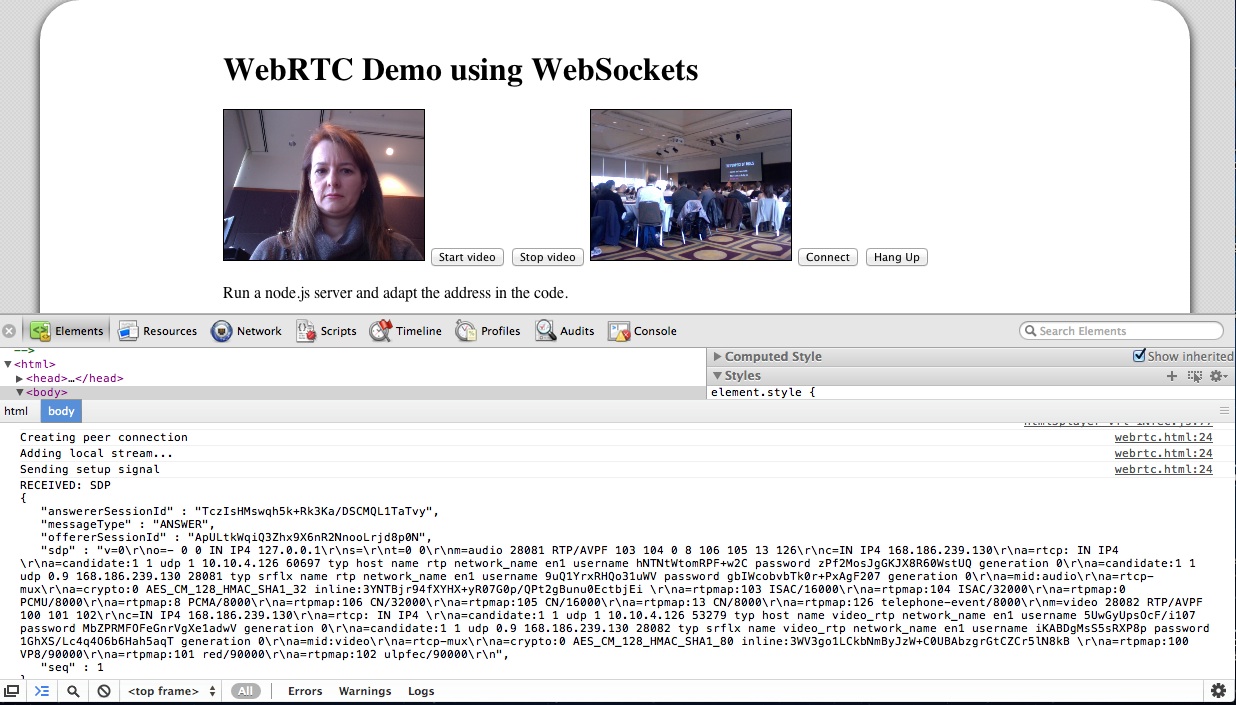
While it is still using Google’s STUN server to get through NAT, the messaging for setting up the connection is running completely through the Web Socket server. The messages that get exchanged are plain SDP message packets with a session ID. There are OFFER, ANSWER, and OK packets exchanged for each streaming direction. You can see some of it in the below image:

WebRTC demo

I’m not running a public WebSocket server, so you won’t be able to see this part of the presentation working. But the local loopback video should work.

At the conference, it all went without a hitch (while the wireless played along). I believe you have to host the WebSocket server on the same machine as the Web page, otherwise it won’t work for security reasons.

A whole new world of opportunities lies out there when we get the ability to set up video conferencing on every Web page - scary and exciting at the same time!

HTML5 multi-track audio or video

In the last months, we’ve been working hard at the WHATWG and W3C to spec out new HTML markup and a JavaScript interface for dealing with audio or video content that has more than just one audio and video track.

This is particularly relevant when a Web page author wants to add a sign language track to a video or audio resource for deaf people, or an audio description track (i.e. a sound track in which a speaker explains the key things that can be seen on screen) for blind people. It is also relevant when a Web page author wants to publish a video with multiple audio tracks that are each a different language dub for the video and can be used for less common cases such as a director’s comment track, or making available different camera angles for an event.

Just to be clear: this is not a means to introduce video editing functionality into the Web browser. If you want to do edits, you’re better off with an application that will eventually render a new piece of content and includes fancy transitions etc. Similarly, this is not a means to introduce mixing functionality (as in what DJs do when they play with multiple audio recordings). You’re better off with an actual audio mixing or DJ application that will provide you all sorts of amazing effects and filters.

So, multi-track is squarely focused on synchronizing alternative or additional tracks to a single resource with a single timeline to which all tracks are slaved.

Two means of publishing such multi-track media content are possible:

  • In-band multi-track
  • Synchronized resources

1. In-band multi-track

In in-band multi-track, there is a single file that has all all the tracks inside it. For this single file, there is now an API in HTML5 that allows addressing and controlling these tracks.

Of the video file formats that Web browsers support, WebM is currently not defined to contain more than one audio or video track. However, since WebM is using the Matroska container format, which supports multi-track, it is possible to extend WebM for multi-track resources. I have seen multitrack Ogg, MP4 and Matroska files in the wild and most media players support their display.

The specification that has gone into HTML5 to support in-band multi-track looks as follows:

``` interface HTMLMediaElement : HTMLElement { [...] // tracks readonly attribute AudioTrackList audioTracks; readonly attribute VideoTrackList videoTracks; }; interface AudioTrackList : EventTarget { readonly attribute unsigned long length; getter AudioTrack (unsigned long index); AudioTrack? getTrackById(DOMString id); attribute EventHandler onchange; attribute EventHandler onaddtrack; attribute EventHandler onremovetrack; }; interface AudioTrack { readonly attribute DOMString id; readonly attribute DOMString kind; readonly attribute DOMString label; readonly attribute DOMString language; attribute boolean enabled; }; interface VideoTrackList : EventTarget { readonly attribute unsigned long length; getter VideoTrack (unsigned long index); VideoTrack? getTrackById(DOMString id); readonly attribute long selectedIndex; attribute EventHandler onchange; attribute EventHandler onaddtrack; attribute EventHandler onremovetrack; }; interface VideoTrack { readonly attribute DOMString id; readonly attribute DOMString kind; readonly attribute DOMString label; readonly attribute DOMString language; attribute boolean selected; }; ```

You will notice that every audio and video track gets an index to address them. You can enable and disable individual audio tracks (via the enabled attribute) and you can select a single video track for display (via the selectedIndex attribute). This means that one or more audio tracks can be active at the same time (e.g. main audio and audio description), but only one video track will be active at a time (e.g. main video or sign language).

Through the id, kind, label and language attributes you can find out more about what actual content is available in the individual tracks so as to activate/deactivate them correctly and display the right information about them.

kind identifies the type of content that the track exposes such as “description” (for audio description), “sign” (for sign language), “main” (for the default displayed track), “translation” (for a dubbed audio track), and “alternative” (for an alternative to the default track).

label provides a human readable string that describes the content of the track aiming to be used in a menu.

id provides a short machine-readable string that can be used to construct a media fragment URI for the track. The use case for this will be discussed later.

language provides a machine-readable language code to identify which language is spoken or signed in an audio or sign language video track.

Example 1:

The following uses a video file that has a main video track, a main audio track in English and French, and an audio description track in English and French. (It likely also has caption tracks, but we will ignore text tracks for now.) This code sample switches the French audio tracks on and all other audio tracks off.

``` <video id="v1" poster=“video.png” controls> <source src=“video.ogv” type=”video/ogg”> <source src=“video.mp4” type=”video/mp4”> </video> <script type="text/javascript"> video = document.getElementsByTagName("video")[0]; for (i=0; i < video.audioTracks.length; i++) { if (video.audioTracks[i].language.substring(0,2) === "fr") { video.audioTracks[i].enabled = true; } else { video.audioTracks[i].enabled = false; } } </script> ```

Example 2:

The following uses a audio file that has a main audio track in English, no main video track, but sign language video tracks in ASL (American Sign Language), BSL (British Sign Language), and ASF (Australian Sign Language). This code sample switches the Australian sign language track on and all other video tracks off.

``` <video id="a1" controls> <source src=“audio_sign.ogg” type=”video/ogg”> <source src=“audio_sign.mp4” type=”video/mp4”> </video> <script type="text/javascript"> video = document.getElementsByTagName("video")[0]; for (i=0; i< video.videoTracks.length; i++) { if (video.videoTracks[i].language === 'sgn-asf') { video.videoTracks[i].selected = true; } else { video.videoTracks[i].selected = false; } } </script> ```

If you have more tracks in both examples that conflict with your intentions, you may need to further filter your activation / deactivation code using the kind attribute.

2. Synchronized resources

Sometimes the production process of media creates not a single resource with multiple contained tracks, but multiple resources that all share the same timeline. This is particularly useful for the Web, because it means the user can download only the required resources, typically saving a substantial amount of bandwidth.

For this situation, an attribute called @mediagroup can be added in markup to slave multiple media elements together. This is administrated in the JavaScript API through a MediaController object, which provides events and attributes for the combined multi-track object.

The new IDL interfaces for HTMLMediaElement are as follows:

``` interface HTMLMediaElement : HTMLElement { [...] // media controller attribute DOMString mediaGroup; attribute MediaController? controller; }; enum MediaControllerPlaybackState { "waiting", "playing", "ended" }; [Constructor] interface MediaController : EventTarget { readonly attribute unsigned short readyState; // uses HTMLMediaElement.readyState's values readonly attribute TimeRanges buffered; readonly attribute TimeRanges seekable; readonly attribute unrestricted double duration; attribute double currentTime; readonly attribute boolean paused; readonly attribute MediaControllerPlaybackState playbackState; readonly attribute TimeRanges played; void pause(); void unpause(); void play(); // calls play() on all media elements as well attribute double defaultPlaybackRate; attribute double playbackRate; attribute double volume; attribute boolean muted; attribute EventHandler onemptied; attribute EventHandler onloadedmetadata; attribute EventHandler onloadeddata; attribute EventHandler oncanplay; attribute EventHandler oncanplaythrough; attribute EventHandler onplaying; attribute EventHandler onended; attribute EventHandler onwaiting; attribute EventHandler ondurationchange; attribute EventHandler ontimeupdate; attribute EventHandler onplay; attribute EventHandler onpause; attribute EventHandler onratechange; attribute EventHandler onvolumechange; }; ```

You will notice that the MediaController replicates some of the states and events of the slave media elements. In general the approach is that the attributes represent the summary state from all the elements and the writable attributes when set are handed through to all the slave elements.

Importantly, if the individual media elements have @controls activated, then the displayed controls interact with the MediaController thus allowing synchronized playback and interaction with the combined multi-track object.

Example 3:

The following uses a video file that has a main video track, a main audio track in English. There is another video file with the ASL sign language for the video, and an audio file with the audio description in English. This code sample creates controls on the first file, which then also control the audio description and the sign language video, neither of which have controls. Since the audio description doesn’t have controls, it doesn’t get visually displayed. The sign language video will just sit next to the main video without controls.

``` <video id="v1" poster=“video.png” controls mediagroup="a11y_vid"> <source src=“video.webm” type=”video/webm”> <source src=“video.mp4” type=”video/mp4”> </video> <video id="v2" poster=“sign.png” mediagroup="a11y_vid"> <source src=“sign.webm” type=”video/webm”> <source src=“sign.mp4” type=”video/mp4”> </video> <audio id="a1" mediagroup="a11y_vid"> <source src=“audio.ogg” type=”audio/ogg”> <source src=“audio.mp3” type=”audio/mp3”> </audio> ```

Example 4:

We now accompany a main video with three sign language video tracks in ASL, BSL and ASF. We could just do this in JavaScript and replace the currentSrc of a second video element with the links to BSL and ASF as required, but then we need to run our own media controls to list the available tracks. So, instead, we create a video element for each one of the tracks and use CSS to remove the inactive ones from the page layout. The code sample activates the ASF track and deactivates the other sign language tracks.

``` <style> video.inactive { display: none; } </style> <video id="v1" poster=“video.png” controls mediagroup="a11y_vid" class="inactive"> <source src=“video.webm” type=”video/webm”> <source src=“video.mp4” type=”video/mp4”> </video> <video id="v2" poster=“sign_asl.png” mediagroup="a11y_vid" > <source src=“sign_asl.webm” type=”video/webm”> <source src=“sign_asl.mp4” type=”video/mp4”> </video> <video id="v3" poster=“sign_bsl.png” mediagroup="a11y_vid" class="inactive"> <source src=“sign_bsl.webm” type=”video/webm”> <source src=“sign_bsl.mp4” type=”video/mp4”> </video> <video id="v4" poster=“sign_asf.png” mediagroup="a11y_vid" class="inactive"> <source src=“sign_asf.webm” type=”video/webm”> <source src=“sign_asf.mp4” type=”video/mp4”> </video> <script type="text/javascript"> videos = document.getElementsByTagName("video"); for (i=0; i < videos.length; i++) { if (videos[i].currentSrc.match(/asf/g).length > 0) { videos[i].class = ""; } else { videos[i].class = "active"; } } </script> ```

Example 5:

In this final example we look at what to do when we have a in-band multi-track resource with multiple video tracks that should all be displayed on screen. This is not a simple problem to solve because a video element is only allowed to display a single video track at a time. Therefore for this problem you need to use both approaches: in-band and synchronized resources.

We take a in-band multitrack resource with a main video and audio track and three sign language tracks in ASL, BSL and ASF. The second resource will be made up from the URI of the first resource with a media fragment address of the sign language tracks. (If required, these can be discovered using the getID() function on the first resource.) The markup will look as follows:

``` <video id="v1" poster=“video.png” controls mediagroup="a11y_vid"> <source src=“video.ogv#track=v_main&track=a_main” type=”video/ogv”> <source src=“video.mp4#track=v_main&track=a_main” type=”video/mp4”> </video> <video id="v2" poster=“sign.png” controls mediagroup="a11y_vid"> <source src=“video.ogv#track=asl&track=bsl&track=asf” type=”video/ogv”> <source src=“video.mp4#track=asl&track=bsl&track=asf” type=”video/mp4”> </video> ```

Note that with multiple video elements you can always style them in the way that you want them displayed on screen. E.g. if you want a picture-in-picture display, you scale the second video down and absolutely position it on top of the first one in the appropriate location. You can even grab the second video into a canvas, chroma-key your sign language speaker on a green or blue screen and remove that background through some canvas processing before popping it on top of the video.

The world is all yours!

HOWEVER: There is one big caveat on all these specs - while they have all found entry into the HTML5 specification, it would be expecting a bit much to have browser support already. :-)

UPDATE 23 July 2014: I’ve just changed this to use the latest spec, which should also at least partially be implemented already.
Ideas for new HTML5 apps

At the recent Linux conference in Brisbane, Australia, I promised a free copy of my book to the person that could send me the best idea for an HTML5 video application. I later also tweeted about it.

While I didn’t get many emails, I am still impressed by the things people want to do. Amongst the posts were the following proposals:

  • Develop a simple video cutting tool to, say setting cut points and having a very simple backend taking the cut points and generating quick enough output. The cutting doesn’t need to retranscode.
  • Develop a polyfill for the track element
  • Use HTML5 video, especially the tracking between video and text, to better present video from the NZ Parliament.
  • Making a small MMO game using WebGL, HTML5 audio and WebSockets. I also want to use the same code for desktop and web.

These are all awesome ideas and I found it really hard to decide whom to give the free book to. In the end, I decided to give it to Brian McKenna, who is working on the MMO game - simply because it it is really pushing the boundaries of several HTML5 technologies.

To everyone else: the book is actually not that expensive to buy from APRESS or Amazon and you can get the eBook version there, too.

Thanks to everyone who started really thinking about this and sent in a proposal!

Talk at Web Directions South, Sydney: HTML5 audio and video

On 14th October I gave a talk at Web Directions South on “HTML5 audio and video - using these exciting new elements in practice”.

I wanted to give people an introduction into how to use these elements while at the same time stirring their imagination as to the design possibilities now that these elements are available natively in browsers. I re-used some of the demos that I have put together for the book that I am currently writing, added some of the cool stuff that others have done and finished off with an outlook towards what new features will probably arrive next.

“Slides” are now available, which are really just a Web page with some demos that work in modern browsers.

Table of contents:

HTML5 Audio and Video

  1. Cross browser
  2. Cross browser
  3. Encoding
  4. Fallback considerations
  5. CSS and
  6. audio plans

Your metadata is not my metadata

Over the last two days we had the Open Subtitles Summit here in New York. It was very exciting to feel the energy in the room to make a change to media accessibility - I am sure we will see much development over the next 12 months. We spoke much about HTML5 video and standards and had many discussions about subtitles, captions, and other accessibility information.

On Wednesday we had a discussion about metadata and I quickly realized that “your metadata is not my metadata”: everyone used the word for something different. So, I suggested to have a metadata discussion on Thursday where we would put a structure onto all of this, identify what kinds of metadata we have and whether and how it should be supported in HTML5 standards.

Our basic findings are very simple and widely accepted. There are three fundamentally different types of metadata:

  • Technical metadata about video: information about the format of the resource - things that can be determined automatically and are non-controversial, such as the width, height, framerate, audio sample rate etc. This information can be used to, e.g. decide if a video is appropriate for a certain device.
  • Semantic metadata about video: semantic information about the video resource - e.g. license, author, publication date, version, attribution, title, description. This information is good for search and identification.
  • Timed semantic metadata: semantic information that is associated with time intervals of the video, not with the full video - e.g. active speaker, location, date-time, objects.

As we talked about this further, however, we identified subclasses of these generic types that are very important to identify because they will be handled differently.

We found that semantic metadata can be separated into universal metadata and domain-specific metadata. Universal metadata is semantic metadata that can basically be applied to any content. There is very little of that and the W3C Media Annotations WG has done a pretty good job in identifying it. Domain-specific metadata is such metadata that only applies to some content, e.g. all the videos about sports have metadata such as game scores, players, or type of sport.

As for adding such metadata into media resources, we discussed that it makes sense to have the universal metadata explicitly spelled out and to have a generic means to associate name-value pairs with resource. Of course it will all be stored in databases, but there was also a requirement to have it encoded into the media resource - and in our discussion case: into external captions or subtitle files.

As for timed metadata - it is possible to separate this into metadata that is only relevant as part of a subtitle or caption file, because the metadata relates to a certain word or a word sequence, and into independent timed metadata that can be stored in, e.g. JSON or some similar format.

Since we are particularly interested in subtitles and captions, the timed metadata that is associated with words or word sequences is particularly important. The most natural metadata that is useful as part of subtitles is of course speaker segmentation. We also identified that hyperlinks to related content are just as important, since it can enable applications such as popcorn.js.

Potentially there is a use for metadata association with any sequence of words in a caption or subtitle, which could be satisfied with the use of a generic markup element for a sequence of words, such that microdata or RDFa may get associated. A request for such a generic means of associating metadata was made. However, the need for it still has to be confirmed with good use cases - the breakout group was out of time as we came to this point. So, leave your ideas for use cases in the requirements - they will help shape standards.

Upcoming conferences / workshops

Lots is happening in open source multimedia land in the next few months.

Check out these cool upcoming conferences / workshops / miniconfs…

September 29th and 30th, New York Open Subtitles Design Summit October 1st and 2nd, New York Open Video Conference

October 3rd and 4th, New York Foundations of Open Media Software Developer Workshop

January 24/25th, Brisbane, Australia LCA Multimedia Miniconf

W3C Media Annotations API standard

Recently, I was asked to review the W3C Media Annotations specifications as they are about to go into Last Call (a state that comes before the request for implementations at the W3C).

The W3C Media Annotations group has defined a set of metadata that they believe is representative and common for media resources. The ontology consist of the following fields:

  • ma:identifier: a URI or string to identify a resource
  • ma:title: a string providing the title of the resource
  • ma:language: a language code describing the language used in the resource
  • ma:locator: the URI at which the resource can be accessed
  • ma:contributor: a URI or string identifying the contributor and the nature of the contribution
  • ma:creator: a URI or string identifying an author
  • ma:createDate: a date of creation or publication of the resource
  • ma:location: a string or geo code identifying where the resource has been shot/recorded
  • ma:description: a string describing the content of the resource
  • ma:keyword: a word or word combination providing a topic, keyword or tag representing the resource
  • ma:genre: a string providing the genre of the resource
  • ma:rating: rating value, including the rating scale
  • ma:relation: a URI and string identifying a related resource and the relationship
  • ma:collection: a URI or string providing the name of a collection to which the resource belongs
  • ma:copyright: a URI or string with the copyright statement.
  • ma:license: a string or URI with the usage license
  • ma:publisher: a string or URI with the publisher of the resource
  • ma:targetAudience: a URI and classification string providing the issuer of the classification and the classification value
  • ma:fragments: a list of string and URI values that identify media fragments and their type
  • ma:namedFragments: a list of string and URI values the provide names to media fragments
  • ma:frameSize: a width - height pair in pixels
  • ma:compression: a string providing the compression algorithm
  • ma:duration: a float to provide the resource duration in seconds
  • ma:format String: the mime type of the resource
  • ma:samplingrate: a float with the audio sampling rate
  • ma:framerate: a float with the video frame rate
  • ma:bitrate: a float providing the average bit rate in kbps
  • ma:numTracks: an int of the number of tracks

Note that some of these fields are not single values, but simple constructs of multiple values. Thus, they are actually more complex than name-value pairs that, e.g. are typically used in HTML meta headers or in Dublin Core. I regard this as an issue for implementations.

The fields were chosen as typical metadata being available about media resources. The media fragments fields are a bit dubious in this respect, but could be useful in future.

The metadata is determined either from within the resource itself or from a metadata collection about the resource. As such, the document maps several existing metadata and media resource formats to this interface, amongst them:

As they didn’t have a mapping table for Ogg content, I offered the following:

MAWGRelationOgg propertiesHow to do the mappingDatatype
Descriptive Properties (Core Set)
Identification
ma:identifierexactNameName field in skeleton header (new)String
ma:titleexactTitleTITLE field in vorbiscomment headerString
exactTitleTitle field in skeleton header (new)String
relatedAlbumALBUM title in vorbiscomment headerString
ma:languageexactLanguageLanguage field in skeleton header (new)language code
ma:locatorexactfile URI from systemURI
Creation
ma:contributorexactArtist, PerformerARTIST and PERFORMER vorbiscomment headersStrings
ma:creatorrelatedOrganizationORGANIZATION field in vorbiscomment header
ma:createDateexactDateDATE field in vorbiscomment headerISO date format
ma:locationexactLocationLOCATION field in vorbiscomment headerString
Content description
ma:descriptionexactDescriptionDESCRIPTION field in vorbiscomment headerString
ma:keywordN/A
ma:genreexactGenreGENRE field in vorbiscomment headerString
ma:ratingN/A
Relational
ma:relationrelatedVersion, TracknumberVERSION (version of a title), TRACKNUMBER (CD track) fields in vorbiscomment headerStrings
ma:collectionrelatedAlbumALBUM field of vorbiscomment headerString
Rights
ma:copyrightexactCopyrightCOPYRIGHT field of vorbiscomment headerString
ma:licenseexactLicenseLICENSE field of vorbiscomment headerString
Distribution
ma:publisherrelatedOrganizationORGNIZATION field of vorbiscomment headerString
ma:targetAudiencemore specificRoleRole field of Skeleton header (new)String
Fragments
ma:fragmentsN/A
ma:namedFragmentsN/A
Technical Properties
ma:frameSizeexactextract from binary header of video trackint, int (width x height)
ma:compressionexactContent-typeContent-type field of Skeleton headerMIME type
ma:durationexactcalculate as duration = last_sample_time - first_sample_time of OggIndex header of skeletonFloat (or rather: rational - rational)
ma:formatexactContent-typeContent-type field of Skeleton headerMIME type
ma:samplingrateexactcalculate as granulerate = granulerate_numerator / granulerate_denominator of Skeleton headerRational (or rather int / int)
ma:framerateexactcalculate as granulerate = granulerate_numerator / granulerate_denominator of Skeleton headerRational (or rather int / int)
ma:bitrateexactcalculate as bitrate = length_of_segment / duration from OggIndex headers of skeletonFloat
ma:numTracksexactTracknumberTRACKNUMBER field of vorbiscomment header (track number on album)Int

You will notice that the table mentions 4 fields in skeleton with a “new” marker - they are actually proposed fields in skeleton - a bit of coding will be necessary to introduce them into software. The space for these fields already exists in message header fields, so it won’t require a change of the skeleton format.

In the second specification of the Media Annotations WG, the group offers a standard API to access (i.e. read) the defined fields. They also intend to create an API to write the fields, but I doubt that will be easy because of the vast amount of file types they intend to support.

There is basically a single function that allows the extraction of metadata: MAObject[] getProperty(in DOMString propertyName, in optional DOMString sourceFormat, in optional DOMString subtype, in optional DOMString language, in optional DOMString fragment );

I proposed it may be possible to include this into HTML5 as follows: interface HTMLMediaElement : HTMLElement { ... getter MAObject getProperty(in DOMString propertyName, in optional unsigned long trackIndex); ... }

This would either extract the property for a particular track in a media resource or for the complete resource if no track index is given. The only problem I see is that the returned object is different depending on the requested property - the MAObject is only a parent class for the returned object types. I am not sure it is therefore possible to specify this easily in HTML5.

Overall I thought the specification was a nice piece of work. I am not sure I agree with all the chosen fields, but that is always an issue with metadata. The most important fields are there and that’s what matters.

Google's challenges of freeing VP8

—\n 189823\n\n17753616 bbb_youtube_h264_499kbit.mp4\n13898515 bbb_youtube_h264_499kbit.h264\n 3796188 bbb_youtube_h264_499kbit.aac\n--------\n 58913\n\nI hope you believe me now..” parent: 0

  • id: 607 author: “DonDiego” authorUrl: "" date: “2010-02-25 09:31:12” content: “@Louise: FLV and MP4 are general-purpose container formats that can contain audio, video, subtitles and metadata in a variety of flavors.” parent: 0
  • id: 608 author: “Monty” authorUrl: “http://xiph.org” date: “2010-02-25 10:53:24” content: “DonDiego, you troll this every chance you get. I’m getting tired of addressing it in one place, having the rebuttal entirely ignored, and then having you plaster it somewhere else, anywhere else that’s visible.\n\nOgg is different from your favorite container. We know. It does not need to be extended for every new codec. It’s a transport layer that does not include metadata (that’s for Skeleton). Mp4 and Nut make metadata part of a giant monolithic design. Whoop-de-do. The overhead depends on how it’s being used (for the high bitrate BBB above, it’s using a tiny page size tuned to low bitrate vids, an aspect of the encoder that produced it, not Ogg itself). Etc, etc. \n\nDoing something different than the way you and your group would do it is not ‘horribly flawed’ it is just… different.\n\nWe’re not dropping Ogg and breaking tens of millions of decoders to use mp4 or Nut just because a few folks are angry that their pet format came too late or because your country doesn’t have software patents. Where I live, patents exist. You’re free to do anything that you want with the codecs, of course. Go ahead and put them in MOV or Nut! As you loudly proclaim, you’re in a country that doesn’t have software patents, so you don’t have to care.\n\nOr, “for the love of all that is holy”, get over it. Last I checked you weren’t willing to use Theora either… so why exactly are you here…? Obvious troll is obvious.” parent: 0
  • id: 609 author: “Chris Smart” authorUrl: “http://blog.christophersmart.com” date: “2010-02-25 11:12:47” content: “@DonDiego\nPage 93 of the ISO Base File Format standard states that Apple, Matsushita and Telefonaktiebolaget LM Ericsson assert patents in relation to this format.\n\nHere’s the standard:\nhttp://standards.iso.org/ittf/PubliclyAvailableStandards/c051533_ISO_IEC_14496-12_2008.zip\n\n-c” parent: 0
  • id: 610 author: “Monty” authorUrl: “http://xiph.org” date: “2010-02-25 11:39:57” content: “Since I have to rebut this again lest it grow legs:\n\nFor the record, If I was redesigning the Ogg container today, I’d consider changing two things:\n\n1) The specific packet length encoding encoding tops out at an overhead efficiency of .5%. If you accept an efficiency hit on small packet sizes, you can improve large packet size efficiency. This is one of the things Diego is ranting about. We actually had an informal meeting about this at FOMS in 2008. We decided that breaking every Ogg decoder ever shipped was not worth a theoretical improvement of .3% (depending on usage).\n\n2) Ogg page checksums are whole-page and mandatory. Today I’d consider making them switchable, where they can either cover the whole page or just the page header. It would optionally reduce the computational overhead for streams where error detection is internal to the codec packet format, or for streams where the user encoding does not care about error detection. Again— not worth breaking the entire install base. \n\nAt FOMS we decided that if we were starting from scratch, the first was a good idea and we were split on the checksums. But we’re not starting from scratch, and compatibility/interop is paramount.\n\nThe third big thing Diego (and the mplayer community in general) hate is the intentional, conscious decision to allow a codec to define how to parse granule positions for that codec’s stream. Granpos parsing thus requires a call into the codec. \n\nThe practical consequence: When an Ogg file contains a stream for which a user doesn’t have the codec installed… they can’t decode the stream! gasp Wait… how is that different from any other system? \n\nWhat’s different is that the demuxer also can’t parse the timestamps on those pages that wouldn’t be decodable anyway. Also, see above, parsing a timestamp requires a call to the installed codec. The mplayer mux layer can’t cope with this design, and they won’t change the player. We’re supposed to change our format instead.\n\nFourth cited difference is that Ogg is transport only and stream metadata is in Skeleton (or some other layer sitting inside the low level Ogg transport stream) rather than part of a monolithic stream transport design. Practical difference? None really. Except that their mux/demux design can’t handle it, and they’re not interested in changing that either.\n\nI hope this clarifies the years of sustained anti-Ogg vitriol from the Mplayer and spin-off communities. Could Ogg be improved? Sure! Is that a reason to burn everything and start over? DonDiego seems to think so.” parent: 0
  • id: 611 author: “Chris Smart” authorUrl: “http://blog.christophersmart.com” date: “2010-02-25 11:41:42” content: “@DonDiego\n\nYour assertion that FLV supports a variety of is not quite true (depends on your definition of “variety” - having “two” could be considered “variety”).\n\nAccording to the spec (“http://www.adobe.com/devnet/flv/pdf/video_file_format_spec_v10.pdf\”), FLV only supports the following Audio formats:\nPCM\nMP3\nNollymoser\nG.711\nAAC\nSpeex\n\nLikewise, only a few video formats are supported, namely:\nVP6\nH.263\nH.264\n\nMost importantly, it does not support free video and audio formats such as Theora and Vorbis.\n\n-c” parent: 0
  • id: 612 author: “Multimedia Mike” authorUrl: “http://multimedia.cx/eggs/” date: “2010-02-25 12:14:31” content: “@Chris Smart: Technically, there’s nothing preventing FLV from supporting a much larger set of audio and video codecs. However, it’s generally only useful to encode codecs that the Adobe Flash Player natively supports since that’s the primary use case for FLV. Adding support for another codec is generally just a matter of deciding on a new unique ID for that codec.\n\nDeciding on a new unique ID for a codec is usually all that’s necessary for adding support for a new codec to a general-purpose container format. It’s why AVI is still such a catch-all format— just think of a new unique ID (32-bit FourCC) for your experimental codec.\n\nThe beef we have with Ogg is — as Monty eloquently describes in his comment — that Ogg increases the coupling between container and codec layers. This adds complexity that most multimedia systems don’t have to deal with.” parent: 0
  • id: 613 author: “Louise” authorUrl: "" date: “2010-02-25 12:17:03” content: “@Monty\n\nVery interesting read!!\n\nIt is scary how a container that is suppose to free us from the proprietary containers, can be so bad.\n\nI found this blog from a x264 developer\nhttp://x264dev.multimedia.cx/?p=292\n\nwhich had this to say about ogg:\n\n[quote]\nMKV is not the best designed container format out there (it” parent: 0
  • id: 614 author: “Multimedia Mike” authorUrl: “http://multimedia.cx/eggs/” date: “2010-02-25 12:23:01” content: “@Louise: “Do you think VP8 would be back wards compatible if it contains 3rd party patents, and they were removed?”\n\nBackwards compatible with what?” parent: 0
  • id: 615 author: “Monty” authorUrl: “http://xiph.org” date: “2010-02-25 14:08:36” content: ”> It is scary how a container that is suppose to free us from the \n> proprietary containers, can be so bad.\n\nIt isn’t. It is very different from one what set of especially pretentious wonks expects and they’ve been wanking about it for coming up on a decade. None of this makes an ounce of difference to users, and somehow other software groups don’t seem to have any trouble with Ogg. For such a fatally flawed system, it seems to work pretty well in practice :-P\n\nSuggestions like ‘They should have just used MKV’ doesn’t make sense. Ogg predates MKV by many years, and interleave is a fairly recent feature in MKV. \n\nThe format designed by the mplayer folks is named Nut. Despite many differences in the details, the system it resembles most closely… is Ogg. Subjective evaluation of course, but I always considered the resemblance uncanny. \n\nLast of all, suppose just out of old fashioned spite and frustration, Xiph says ‘No more Ogg for the container! We use Nut now!’ That… pretty much ends FOSS’s practical chances of having any relevance in web video or really any net multimedia for the forseeable future. …all to get that .3% and a design change under the blankets that no user could ever possibly care about. Sign me up!” parent: 0
  • id: 616 author: “silvia” authorUrl: “http://blog.gingertech.net/” date: “2010-02-25 20:39:55” content: “@DonDiego To be fair, in your file size example, you should provide the correct sums:\n\n== quote\n17307153 bbb_theora_486kbit.ogv\n15009926 bbb_theora_486kbit.theora\n2107404 bbb_theora_486kbit.vorbis\n” parent: 0
  • id: 617 author: “Louise” authorUrl: "" date: “2010-02-25 21:20:28” content: “@Monty\n\nWas NUT designed before MKV was released?” parent: 0
  • id: 618 author: “DonDiego” authorUrl: "" date: “2010-02-25 22:39:45” content: “@silvia: I am providing the correct sums! You are misreading my table. Let me reformat the table slightly and pad with zeroes for readability:\n\n 17307153 bbb_theora_486kbit.ogv (the complete file)\n- 15009926 bbb_theora_486kbit.theora (the video track)\n- 02107404 bbb_theora_486kbit.vorbis (the audio track)\n ========\n 00189823 (container overhead)\n\n 17753616 bbb_youtube_h264_499kbit.mp4 (the complete file)\n- 13898515 bbb_youtube_h264_499kbit.h264 (the video track)\n- 03796188 bbb_youtube_h264_499kbit.aac (the audio track)\n ========\n 00058913 (container overhead)\n\nSo in this application, Ogg has more than 300% the overhead of MP4. Ogg is known to produce large overhead, but I did not expect this order of magnitude. Now I believe Monty that it’s possible to reduce this, but the purpose of Greg’s comparison was to test this particular configuration without additional tweaks. Otherwise the H.264 and AAC encoding settings could be tweaked further as well…\n\nI wonder what you tested when you say that in your experience Ogg files come out smaller than MPEG files. The term “MPEG files” is about as broad as it gets in the multimedia world. Yes, the MPEG-TS container has very high overhead, but it is designed for streaming over lossy sattelite links. This special purpose warrants the overhead tradeoff.” parent: 0
  • id: 619 author: “DonDiego” authorUrl: "" date: “2010-02-25 22:44:32” content: “@louise: NUT was designed after Matroska already existed.” parent: 0
  • id: 620 author: “Monty” authorUrl: “http://www.xiph.org/” date: “2010-02-26 08:16:54” content: “Silvia: DonDiego was illustrating a broken-out subtraction. His numbers are correct, as is his claim; Ogg is introducing more overhead (1%). That’s almost certainly reduceable, but I’ve not looked at the page structure in Vorbose to be sure of that claim. .5%-.7% is the intended working range. It climbs if the muxer is splitting too many packets or the packets are just too small (not the case here).\n\n>So in this application, Ogg has more than 300% the overhead of MP4. \n>Ogg is known to produce large overhead, but I did not expect this \n>order of magnitude.\n\nYes, Ogg is using more overhead. Let’s assume that a better muxer gets me .7% overhead (yeah, even our own muxer is overly straightforward and doesn’t try anything fancy; it hasn’t been updated since 1998 or so. “Have to extend to container for every new codec” jeesh…)\n\nSo this is really a screaming fight over the difference between .7% and .3%? \n\nI don’t debate for a second that Nut’s packet length encoding is better, and that’s the lion’s share of the difference assuming the file is muxed properly. And if/when (long term view, ‘when’ is almost certainly correct) Ogg needs to be refreshed in some way that has to break spec anyway, the Nut packet encoding will be one of the first things added because at that point it’s a ‘why not?’. But until then there’s no sensible way to defend the havoc a container change would wreak and all for reducing a .7% bitstream overhead down to .3%. It would be optimising something completely insignificant at great practical cost.” parent: 0
  • id: 621 author: “silvia” authorUrl: “http://blog.gingertech.net/” date: “2010-02-26 10:07:54” content: “@monty, @DonDiego thanks for the clarifications” parent: 0
  • id: 622 author: “DonDiego” authorUrl: "" date: “2010-02-26 11:43:00” content: “@Monty: You are giving me far too much credit! “for the love of all that is holy and some that is not, don’t do that” is a quote from Mans in reply to somebody proposing to add ‘#define _GNU_SOURCE’ to FFmpeg. I have been looking for an opportunity to steal that phrase and take credit as being funny for a long time. SCNR ;-p\n\nSpeaking of memorable quotes I cannot help but point at the following classic out of your feather after trying and failing to get patches into MPlayer:\nhttp://lists.mplayerhq.hu/pipermail/mplayer-dev-eng/2007-November/054865.html\n\n======\nFine. I give up.\n\nThere are plenty of things about the design worth arguing about… but\nyou guys are more worried about the color of the mudflaps on this\ndumptruck. You’re rejecting considered decisions out of hand with\nvague, irrelevant dogma. I’ve seen two legitimate bugs brought up so\nfar in a mountain of “WAAAH! WE DON’T LIKE YOUR INDEEEEENT.”\n\nI have the only mplayer/mencoder on earth that can always dump WMV2\nand WMV3 without losing sync. I just needed it for me. I thought it\nwould be nice to submit it for all your users who have been asking for\nthis for years. But it just ceased being worth it.\n\nPatch retracted. You can all go fuck yourselves. Life is too short\nfor this asshattery.\n\nMonty\n=====\n\nWe remember you fondly. I and many others didn’t know what asshat meant before, but now it found a place in everybody’s active vocabulary. I’m not being ironic BTW, sometimes nothing warms the heart more than a good flame and few have generated more laughter than yours :-)\n\nThe ironic thing is that your fame brought you attention and the attention brought detailed reviews, which made patch acceptance harder.\n\nI also failed getting patches into Tremor. You rejected them for silly reasons, but, admittedly, I did not have the energy to flame it through…\n\nFor the record: I have no vested interest in NUT. Some of the comments above could be read to suggest that Ogg would be a good base when starting from a clean slate. This is wrong, Ogg is the weakest part of the Xiph stack. You know that, but there are people all around the internet proclaiming otherwise. This does not help your case, on the contrary, so I try to inject facts into the discussion. Admittedly, sometimes I do it with a little bit of flair of my own ;-)\n\nCheers, Diego” parent: 0
  • id: 623 author: “Monty” authorUrl: “http://www.xiph.org/” date: “2010-02-26 12:06:52” content: “@DonDiego\n\na) I was indeed bucking up against rampant asshattery.\n\nb) Not sure how any of that is even slightly relevant to this thread.\n\nYou’re bringing it up in some sort of attempt to shame or embarrass because you’ve lost on facts? For the record, I meant it when I said it then, and I don’t feel any differently now. And asshat is indeed a fabulous word.\n\n[FTR, you’ve had two patches rejected and several more accepted if the twelve hits from Xiph.Org Trac are a complete set.]\n\nMonty” parent: 0
  • id: 624 author: “silvia” authorUrl: “http://blog.gingertech.net/” date: “2010-02-26 12:12:01” content: “This blog is not for personal attacks, but only for discussing technical issues. Unfortunately, the discussion on these comments is developing in a way that I cannot support any longer. I have therefore decided to close comments.\n\nThank you everyone for your contributions.” parent: 0

Since On2 Technology’s stockholders have approved the merger with Google, there are now first requests to Google to open up VP8.

I am sure Google is thinking about it. But … what does “it” mean?

Freeing VP8 Simply open sourcing it and making it available under a free license doesn’t help. That just provides open source code for a codec where relevant patents are held by a commercial entity and any other entity using it would still need to be afraid of using that technology, even if it’s use is free.

So, Google has to make the patents that relate to VP8 available under an irrevocable, royalty-free license for the VP8 open source base, but also for any independent implementations of VP8. This at least guarantees to any commercial entity that Google will not pursue them over VP8 related patents.

Now, this doesn’t mean that there are no submarine or unknown patents that VP8 infringes on. So, Google needs to also undertake an intensive patent search on VP8 to be able to at least convince themselves that their technology is not infringing on anyone else’s. For others to gain that confidence, Google would then further have to indemnify anyone who is making use of VP8 for any potential patent infringement.

I believe - from what I have seen in the discussions at the W3C - it would only be that last step that will make companies such as Apple have the confidence to adopt a “free” codec.

An alternative to providing indemnification is the standardisation of VP8 through an accepted video standardisation body. That would probably need to be ISO/MPEG or SMPTE, because that’s where other video standards have emerged and there are a sufficient number of video codec patent holders involved that a royalty-free publication of the standard will hold a sufficient number of patent holders “under control”. However, such a standardisation process takes a long time. For HTML5, it may be too late.

Technology Challenges Also, let’s not forget that VP8 is just a video codec. A video codec alone does not encode a video. There is a need for an audio codec and a encapsulation format. In the interest of staying all open, Google would need to pick Vorbis as the audio codec to go with VP8. Then there would be the need to put Vorbis and VP8 in a container together - this could be Ogg or MPEG or QuickTime’s MOOV. So, apart from all the legal challenges, there are also technology challenges that need to be mastered.

It’s not simple to introduce a “free codec” and it will take time!

Google and Theora There is actually something that Google should do before they start on the path of making VP8 available “for free”: They should formulate a new license agreement with Xiph (and the world) over VP3 and Theora. Right now, the existing license that was provided by On2 Technologies to Theora (link is to an early version of On2’s open source license of VP3) was only for the codebase of VP3 and any modifications of it, but doesn’t in an obvious way apply to an independent re-implementations of VP3/Theora. The new agreement between Google and Xiph should be about the patents and not about the source code. (UPDATE: The actual agreement with Xiph apparently also covers re-implementations - see comments below.)

That would put Theora in a better position to be universally acceptable as a baseline codec for HTML5. It would allow, e.g. Apple to make their own implementation of Theora - which is probably what they would want for ipods and iphones. Since Firefox, Chrome, and Opera already support Ogg Theora in their browsers using the on2 licensed codebase, they must have decided that the risk of submarine patents is low. So, presumably, Apple can come to the same conclusion.

Free codecs roadmap I see this as the easiest path towards getting a universally acceptable free codec. Over time then, as VP8 develops into a free codec, it could become the successor of Theora on a path to higher quality video. And later still, when the Internet will handle large resolution video, we can move on to the BBC’s Dirac/VC2 codec. It’s where the future is. The present is more likely here and now in Theora.

ADDITION: Please note the comments from Monty from Xiph and from Dan, ex-On2, about the intent that VP3 was to be completely put into the hands of the community. Also, Monty notes that in order to implement VP3, you do not actually need any On2 patents. So, there is probably not a need for Google to refresh that commitment. Though it might be good to reconfirm that commitment.

ADDITION 10th April 2010: Today, it was announced that Google put their weight behind the Theorarm implementation by helping to make it BSD and thus enabling it to be merged with Theora trunk. They also confirm on their blog post that Theora is “really, honestly, genuinely, 100% free”. Even though this is not a legal statement, it is good that Google has confirmed this.

Demo of new HTML5 features

Ian Hickson, the main editor of the new HTML5 specification, gave a talk about some of the cool new features in HTML5 and some of the early implementations of these features in different browsers.

It’s pretty long demo with 1:25 hrs but he types in all the code manually, so you can re-do all of the demos yourself. The script of the talk with code examples is here.

The first 5 minutes are about the new video element and really worth watching.

Also, at 1:11 hrs Ian is asked about the choice of baseline codecs, in case you want to hear him speak what he has publicly written elsewhere.

I can’t wait to marry the video features with:

  1. the new media fragment addressing schemes in development at the W3C
  2. captions, subtitles and other timed text annotations for videos.

These will allow us search for specific topics directly inside the video (such as “form controls” in Ian’s video) and to hyperlink straight into these time offsets. A completely new world is coming!