The key driving force for improvements to WebVTT continues to be the accurate representation of CEA608/708 captioning. As part of that drive, we’ve introduced regions (the CEA708 “window” concept) to WebVTT. WebVTT regions satisfy multiple requirements of CEA608/708 captions:
support for rollup captions
support for background color and border color on a group of cues independent of the background color of the individual cue
possibility to move a group of cues from one location on screen to a different
support to specify an anchor point and a growth direction for cues when their text size changes
support for specifying a fixed number of lines to be rendered
possibility to specify which region is rendered in front of which other one when regions overlap
While WebVTT regions enable us to satisfy all of the above points, the specification isn’t actually complete yet and some of the above needs aren’t satisfied yet.
We have an open bug to move a region elsewhere. A first discussion at FOMS seemed to to indicate that we’ll have to add syntax for updating a region at a particular time and thus give region definitions a way to be valid only for a certain time frame. I can imagine that the region definitions that we have in the header of the WebVTT file now would have an implicitly defined time frame from the start to the end of the file, but can be overruled by a re-definition anywhere within the WebVTT file. That redefinition needs to provide a start and end time.
We registered a bug to add specifying the width and height of regions (and possibly of cues) by em (i.e. by multiples of the largest character in a font). This should allow us to have the region grow/shrink around the region anchor point with a change of font size by script or a user. em specifications should also be applied to cues - that matches the column count of CEA708/608 better.
When regions overlap, the original region extension spec already suggested a “layer” cue setting. It will be easy to add it.
Another change that we will ultimately need is the “scroll” setting: we will need to introduce support for scrolling text down or from left-to-right or right-to-left, e.g. vertical scrolling text seems to be used in some Chinese caption use cases.
2. Unify Rendering Approach
The introduction of regions created a second code path in the rendering spec with some duplication. At FOMS we discussed if it was possible to unify that. The suggestion is to render all cues into a region. Those that are not part of a region would be rendered into an anonymous region that covers the complete viewport. There may be some consequences to this, e.g. cue settings should be usable across all cues, no matter whether or not part of a region, and avoiding cue overlap may need to be done within regions.
Here’s a rough outline of the path of the new rendering algorithm:
Create a cue box and put it in its region (anonymous if none given).
Calculate position & size of cue box from cue settings (position, line, size).
Calculate position of cue text inside cue box from remaining cue settings (vertical, align).
3. Vertical Features
WebVTT includes vertical rendering, both right-to-left and left-to-right. However, regions are not defined for vertical. Eventually, we’re going to have to look at the vertical features of WebVTT with more details and figure out whether the spec is working for them and what real-world requirements we have missed. We hope we can get some help from users in countries where vertically rendered captions/subtitles are the norm.
4. Best Practices
Some of he WebVTT users at FOMS suggested it would be advantageous to start a list of “best practices” for how to author captions with WebVTT. Example recommendations are:
Use line numbers only to position cues from top or bottom of viewport. Don’t use otherwise.
Note that when the user increases the fontsize in rollup captions and thus introduces new line breaks, your cues will roll by faster because the number of lines of a rollup is fixed.
Make sure to use and UTF-8 markers to control the directionality of your text.
It would be nice if somebody started such a document.
A common use case for timed data is the use of preview thumbnails on the navigation bar of videos. A native implementation of preview thumbnails would allow crawlers and search engines to have a standardised way of extracting timed images for media files, so introduction of a new @kind value “thumbnails” was suggested.
The content of a “thumbnails” cue could be any of:
an image URL
a sprite URL to a single image
a spatial & temporal media fragment URL to a media resource
base64 encoded image (data URI)
an iframe offset to the media resource
The suggestion is to allow anything that would work in a img @src attribute as value in a cue of @kind=“thumbnails”. Responsive images might also be useful for a track of @kind=“thumbnails”. It may even be possible to define an inband thumbnail track based on the track of @kind=“thumbnails”. Such cues should also work in the JavaScript track API.
5.2 Chapter markers
There is interest to put richer content than just a chapter title into chapter cues. Often, chapters consist of a title, text and and image. The text is not so important, but the image is used almost everywhere that chapters are used. There may be a need to extend chapter cue content with images, similar to what a @kind=“thumbnails” track offers.
The conclusion that we arrived at was that we need to make @kind=“thumbnails” work first and then look at using the learnings from that to extend @kind=“chapters”.
5.3 Inband tracks for live video
A difficult topic was opened with the question of how to transport text tracks in live video. In live captioning, end times are never created for cues, but are implied by the start time of the next cue. This is a use case that hasn’t been addressed in HTML5/WebVTT yet. An old proposal to allow a special end time value of “NEXT” was discussed and recommended for adoption. Also, there was support for the spec change that stops blocking loading VTT until all cues have been loaded.
5.4 Cross-domain VTT loading
A brief discussion centered around the fact that the spec disallows cross-domain loading of WebVTT files, but that no browser implements this. This needs to be discussion at the HTML WG level.
6. Regions in live captioning
The final topic that we discussed was how we could provide support for regions in live captioning.
The currently active region definitions will need to be come part of every header of every VTT file segment that HLS uses, so it’s available in case the cues in the segment file reference it.
“NEXT” in end time markers would make authoring of live captioned VTT files easier.
If the application wants to use 1 word at a time and doesn’t want to delay sending the word until the full cue is authored (e.g. in a Hangout type environment), we will need to introduce the concept of “cue continuation markers”, so we know that a cue could be extended with the next VTT file fragment.
This is an extensive and impressive amount of discussion around WebVTT and a lot of new work to be performed in the future. I’m very grateful for all the people who have contributed to these discussions at FOMS and will hopefully continue to help get the specifications right.
The slide provide a high-level summary of the accessibility features that we’ve developed in the W3C for HTML5, including:
Subtitles & Captions with WebVTT and the track element
Video Descriptions with WebVTT, the track element and speech synthesis
Chapters with WebVTT for semantic navigation
Audio Descriptions through synchronising an audio track with a video
Sign Language video synchronized with a main video
I received some excellent questions.
The obvious one was about why WebVTT and not TTML. While for anyone who has tried to implement TTML support, the advantages of WebVTT should be clear, for some the decision of the browsers to go with WebVTT still seems to be bothersome. The advantages of CSS over XSL-FO in a browser-context are obvious, but not as much outside browsers. So, the simplicity of WebVTT and the clear integration with HTML have to speak for themselves. Conversion between TTML and WebVTT was a feature that was being asked for.
I received a question about how to support ducking (reduce the volume of the main audio track) when using video descriptions. My reply was to either use video descriptions with WebVTT and do ducking during the times that a cue is active, or when using audio descriptions (i.e. actual audio tracks) to add an additional WebVTT file of kind=metadata to mark the intervals in which to do ducking. In both cases some JavaScript will be necessary.
I received another question about how to do clean audio, which I had almost forgotten was a requirement from our earlier media accessibility document. “Clean audio” consists of isolating the audio channel containing the spoken dialog and important non-speech information that can then be amplified or otherwise modified, while other channels containing music or ambient sounds are attenuated. I suggested using the mediagroup attribute to provide a main video element (without an audio track) and then the other channels as parallel audio tracks that can be turned on and off and attenuated individually. There is some JavaScript coding involved on top of the APIs that we have defined in HTML, but it can be implemented in browsers that support the mediagroup attribute.
Another question was about the possibilities to extend the list of @kind attribute values. I explained that right now we have a proposal for a new text track kind=“forced” so as to provide forced subtitles for sections of video with foreign language. These would be on when no other subtitle or caption tracks are activated. I also explained that if there is a need for application-specific text tracks, the kind=“metadata” would be the correct choice.
I received some further questions, in particular about how to apply styling to captions (e.g. color changes to text) and about how closely the browser are able to keep synchronization across multiple media elements. The earlier was easily answered with the ::cue pseudo-element, but the latter is a quality of implementation feature, so I had to defer to individual browsers.
Overall it was a good exercise to summarize the current state of HTML5 video accessibility and I was excited to show off support in Chrome for all the features that we designed into the standard.
The W3C HTML WG and the WHATWG are currently discussing the introduction of a
element into HTML.
The
element has been proposed by Steve Faulkner and is specified in a draft extension spec which is about to be accepted as a FPWD (first public working draft) by the W3C HTML WG. This implies that the W3C HTML WG will be looking for implementations and for feedback by implementers on this spec.
I am supportive of the introduction of a
element into HTML. However, I believe that the current spec and use case list don’t make a good enough case for its introduction. Here are my thoughts.
Main use case: accessibility
In my opinion, the main use case for the introduction of
is accessibility.
Like any other users, when blind users want to perceive a Web page/application, they need to have a quick means of grasping the content of a page. Since they cannot visually scan the layout and thus determine where the main content is, they use accessibility technology (AT) to find what is known as “landmarks”.
“Landmarks” tell the user what semantic content is on a page: a header (such as a banner), a search box, a navigation menu, some asides (also called complementary content), a footer, … and the most important part: the main content of the page. It is this main content that a blind user most often wants to skip to directly.
In the days of HTML4, a hidden “skip to content” link at the beginning of the Web page was used as a means to help blind users access the main content.
In the days of ARIA, the aria @role=main enables authors to avoid a hidden link and instead mark the element where the main content begins to allow direct access to the main content. This attribute is supported by AT - in particular screen readers - by making it part of the landmarks that AT can directly skip to.
Both the hidden link and the ARIA @role=main approaches are, however, band aids: they are being used by those of us that make “finished” Web pages accessible by adding specific extra markup.
A world where ARIA is not necessary and where accessibility developers would be out of a job because the normal markup that everyone writes already creates accessible Web sites/applications would be much preferable over the current world of band-aids.
Therefore, to me, the primary use case for a
element is to achieve exactly this better world and not require specialized markup to tell a user (or a tool) where the main content on a page starts.
An immediate effect would be that pages that have a
element will expose a “main” landmark to blind and vision-impaired users that will enable them to directly access that main content on the page without having to wade through other text on the page. Without a element, this functionality can currently only be provided using heuristics to skip other semantic and structural elements and is for this reason not typically implemented in AT.
Other use cases
The
element is a semantic element not unlike other new semantic elements such as ,
With the latest developments in HTML5 and the still fairly new ARIA (Accessible Rich Interface Applications) attributes introduced by the W3C WAI (Web Accessibility Initiative), browsers have now implemented many features that allow you to make your JavaScript-heavy Web applications accessible.
Since I began working on making a complex web application accessible just over a year ago, I discovered that there was no step-by-step guide to approaching the changes necessary for creating an accessible Web application. Therefore, many people believe that it is still hard, if not impossible, to make Web applications accessible. In fact, it can be approached systematically, as this article will describe.
This post is based on a talk that Alice Boxhall and I gave at the recent Linux.conf.au titled “Developing accessible Web apps – how hard can it be?” (slides, video), which in turn was based on a Google Developer Day talk by Rachel Shearer (slides).
These talks, and this article, introduce a process that you can follow to make your Web applications accessible: each step will take you closer to having an application that can be accessed using a keyboard alone, and by users of screenreaders and other accessibility technology (AT).
The recommendations here only roughly conform to the requirements of WCAG (Web Content Accessibility Guidelines), which is the basis of legal accessibility requirements in many jurisdictions. The steps in this article may or may not be sufficient to meet a legal requirement. It is focused on the practical outcome of ensuring users with disabilities can use your Web application.
Step-by-step Approach
The steps to follow to make your Web apps accessible are as follows:
Use native HTML tags wherever possible
Make interactive elements keyboard accessible
Provide extra markup for AT (accessibility technology)
If you are a total newcomer to accessibility, I highly recommend installing a screenreader and just trying to read/navigate some Web pages. On Windows you can install the free NVDA screenreader, on Mac you can activate the pre-installed VoiceOver screenreader, on Linux you can use Orca, and if you just want a browser plugin for Chrome try installing ChromeVox.
1. Use native HTML tags
As you implement your Web application with interactive controls, try to use as many native HTML tags as possible.
HTML5 provides a rich set of elements which can be used to both add functionality and provide semantic context to your page. HTML4 already included many useful interactive controls, like ,
I spoke about the video and audio element in HTML5, how to provide fallback content, how to encode content, how to control them from JavaScript, and briefly about Drupal video modules, though the next presentation provided much more insight into those. I explained how to make the HTML5 media elements accessible, including accessible controls, captions, audio descriptions, and the new WebVTT file format. I ran out of time to introduce the last section of my slides which are on WebRTC.
Linux.conf.au
On the first day of LCA I gave a talk both in the Multimedia Miniconf and the Browser Miniconf.
Browser Miniconf
In the Browser Miniconf I talked about “Web Standardisation – how browser vendors collaborate, or not” (slides). Maybe the most interesting part about this was that I tried out a new slide “deck” tool called impress.js. I’m not yet sure if I like it but it worked well for this talk, in which I explained how the HTML5 spec is authored and who has input.
I also sat on a panel of browser developers in the Browser Miniconf (more as a standards than as a browser developer, but that’s close enough). We were asked about all kinds of latest developments in HTML5, CSS3, and media standards in the browser.
Multimedia Miniconf
In the Multimedia Miniconf I gave a “HTML5 media accessibility update” (slides). I talked about the accessibility problems of Flash, how native HTML5 video players will be better, about accessible video controls, captions, navigation chapters, audio descriptions, and WebVTT. I also provided a demo of how to synchronize multiple video elements using a polyfill for the multitrack API.
Finally, and most importantly, Alice Boxhall and myself gave a talk in the main linux.conf.au titled “Developing Accessible Web Apps - how hard can it be?” (video, slides). I spoke about a process that you can follow to make your Web applications accessible. I’m writing a separate blog post to explain this in more detail. In her part, Alice dug below the surface of browsers to explain how the accessibility markup that Web developers provide is transformed into data structures that are handed to accessibility technologies.
The Open Video Conference that took place on 10-12 September was so overwhelming, I’ve still not been able to catch my breath! It was a dense three days for me, even though I only focused on the technology sessions of the conference and utterly missed out on all the policy and content discussions.
Roughly 60 people participated in the Open Media Software (OMS) developers track. This was an amazing group of people capable and willing to shape the future of video technology on the Web:
HTML5 video developers from Apple, Google, Opera, and Mozilla (though we missed the NZ folks),
codec developers from WebM, Xiph, and MPEG,
Web video developers from YouTube, JWPlayer, Kaltura, VideoJS, PopcornJS, etc.,
content publishers from Wikipedia, Internet Archive, YouTube, Netflix, etc.,
open source tool developers from FFmpeg, gstreamer, flumotion, VideoLAN, PiTiVi, etc,
and many more.
To provide a summary of all the discussions would be impossible, so I just want to share the key take-aways that I had from the main sessions.
Tim Terriberry (Mozilla), Serge Lachapelle (Google) and Ethan Hugg (CISCO) moderated this session together (slides). There are activities both at the W3C and at IETF - the ones at IETF are supposed to focus on protocols, while the W3C ones on HTML5 extensions.
The current proposal of a PeerConnection API has been implemented in WebKit/Chrome as open source. It is expected that Firefox will have an add-on by Q1 next year. It enables video conferencing, including media capture, media encoding, signal processing (echo cancellation etc), secure transmission, and a data stream exchange.
Current discussions are around the signalling protocol and whether SIP needs to be required by the standard. Further, the codec question is under discussion with a question whether to mandate VP8 and Opus, since transcoding gateways are not desirable. Another question is how to measure the quality of the connection and how to report errors so as to allow adaptation.
What always amazes me around RTC is the sheer number of specialised protocols that seem to be required to implement this. WebRTC does not disappoint: in fact, the question was asked whether there could be a lighter alternative than to re-use dozens of years of protocol development - is it over-engineered? Can desktop players connect to a WebRTC session?
We are already in a second or third revision of this part of the HTML5 specification and yet it seems the requirements are still being collected. I’m quietly confident that everything is done to make the lives of the Web developer easier, but it sure looks like a huge task.
Zohar Babin (Kaltura) and myself moderated this session and I must admit that this session was the biggest eye-opener for me amongst all the sessions. There was a large number of Flash developers present in the room and that was great, because sometimes we just don’t listen enough to lessons learnt in the past.
This session gave me one of those aha-moments: it the form of the Flash appendBytes() API function.
The appendBytes() function allows a Flash developer to take a byteArray out of a connected video resource and do something with it - such as feed it to a video for display. When I heard that Web developers want that functionality for JavaScript and the video element, too, I instinctively rejected the idea wondering why on earth would a Web developer want to touch encoded video bytes - why not leave that to the browser.
But as it turns out, this is actually a really powerful enabler of functionality. For example, you can use it to:
display mid-roll video ads as part of the same video element,
sequence playlists of videos into the same video element,
implement DVR functionality (high-speed seeking),
do mash-ups,
do video editing,
adaptive streaming.
This totally blew my mind and I am now completely supportive of having such a function in HTML5. Together with media fragment URIs you could even leave all the header download management for resources to the Web browser and just request time ranges from a video through an appendBytes() function. This would be easier on the Web developer than having to deal with byte ranges and making sure that appropriate decoding pipelines are set up.
Philip Jagenstedt (Opera) and myself moderated this session. We focused on the HTML5 track element and the WebVTT file format. Many issues were identified that will still require work.
One particular topic was to find a standard means of rendering the UI for caption, subtitle, und description selection. For example, what icons should be used to indicate that subtitles or captions are available. While this is not part of the HTML5 specification, it’s still important to get this right across browsers since otherwise users will get confused with diverging interfaces.
Chaptering was discussed and a particular need to allow URLs to directly point at chapters was expressed. I suggested the use of named Media Fragment URLs.
The use of WebVTT for descriptions for the blind was also discussed. A suggestion was made to use the voice tag to allow for “styling” (i.e. selection) of the screen reader voice.
Finally, multitrack audio or video resources were also discussed and the @mediagroup attribute was explained. A question about how to identify the language used in different alternative dubs was asked. This is an issue because @srclang is not on audio or video, only on text, so it’s a missing feature for the multitrack API.
Beyond this session, there was also a breakout session on WebVTT and the track element. As a consequence, a number of bugs were registered in the W3C bug tracker.
This session was moderated by John Luther and John Koleszar, both of the WebM Project. They started off with a presentation on current work on WebM, which includes quality testing and improvements, and encoder speed improvement. Then they moved on to questions about how to involve the community more.
The community criticised that communication of what is happening around WebM is very scarce. More sharing of information was requested, including a move to using open Google+ hangouts instead of Google internal video conferences. More use of the public bug tracker can also help include the community better.
Another pain point of the community was that code is introduced and removed without much feedback. It was requested to introduce a peer review process. Also it was requested that example code snippets are published when new features are announced so others can replicate the claims.
This all indicates to me that the WebM project is increasingly more open, but that there is still a lot to learn.
This session was moderated by Frank Galligan and Aaron Colwell (Google), and Mark Watson (Netflix).
Mark started off by giving us an introduction to MPEG DASH, the MPEG file format for HTTP adaptive streaming. MPEG has just finalized the format and he was able to show us some examples. DASH is XML-based and thus rather verbose. It is covering all eventualities of what parameters could be switched during transmissions, which makes it very broad. These include trick modes e.g. for fast forwarding, 3D, multi-view and multitrack content.
MPEG have defined profiles - one for live streaming which requires chunking of the files on the server, and one for on-demand which requires keyframe alignment of the files. There are clear specifications for how to do these with MPEG. Such profiles would need to be created for WebM and Ogg Theora, too, to make DASH universally applicable.
Further, the Web case needs a more restrictive adaptation approach, since the video element’s API is already accounting for some of the features that DASH provides for desktop applications. So, a Web-specific profile of DASH would be required.
Then Aaron introduced us to the MediaSource API and in particular the webkitSourceAppend() extension that he has been experimenting with. It is essentially an implementation of the appendBytes() function of Flash, which the Web developers had been asking for just a few sessions earlier. This was likely the biggest announcement of OVC, alas a quiet and technically-focused one.
Aaron explained that he had been trying to find a way to implement HTTP adaptive streaming into WebKit in a way in which it could be standardised. While doing so, he also came across other requirements around such chunked video handling, in particular around dynamic ad insertion, live streaming, DVR functionality (fast forward), constraint video editing, and mashups. While trying to sort out all these requirements, it became clear that it would be very difficult to implement strategies for stream switching, buffering and delivery of video chunks into the browser when so many different and likely contradictory requirements exist. Also, once an approach is implemented and specified for the browser, it becomes very difficult to innovate on it.
Instead, the easiest way to solve it right now and learn about what would be necessary to implement into the browser would be to actually allow Web developers to queue up a chunk of encoded video into a video element for decoding and display. Thus, the webkitSourceAppend() function was born (specification).
The proposed extension to the HTMLMediaElement is as follows:
partial interface HTMLMediaElement { // URL passed to src attribute to enable the media source logic. readonly attribute [URL] DOMString webkitMediaSourceURL; bool webkitSourceAppend(in Uint8Array data); // end of stream status codes. const unsigned short EOS_NO_ERROR = 0; const unsigned short EOS_NETWORK_ERR = 1; const unsigned short EOS_DECODE_ERR = 2; void webkitSourceEndOfStream(in unsigned short status); // states const unsigned short SOURCE_CLOSED = 0; const unsigned short SOURCE_OPEN = 1; const unsigned short SOURCE_ENDED = 2; readonly attribute unsigned short webkitSourceState;};
The code is already checked into WebKit, but commented out behind a command-line compiler flag.
Frank then stepped forward to show how webkitSourceAppend() can be used to implement HTTP adaptive streaming. His example uses WebM - there are no examples with MPEG or Ogg yet.
The chunks that Frank’s demo used were 150 video frames long (6.25s) and 5s long audio. Stream switching only switched video, since audio data is much lower bandwidth and more important to retain at high quality. Switching was done on multiplexed files.
Every chunk requires an XHR range request - this could be optimised if the connections were kept open per adaptation. Seeking works, too, but since decoding requires download of a whole chunk, seeking latency is determined by the time it takes to download and decode that chunk.
Similar to DASH, when using this approach for live streaming, the server has to produce one file per chunk, since byte range requests are not possible on a continuously growing file.
Frank did not use DASH as the manifest format for his HTTP adaptive streaming demo, but instead used a hacked-up custom XML format. It would be possible to use JSON or any other format, too.
After this session, I was actually completely blown away by the possibilities that such a simple API extension allows. If I wasn’t sold on the idea of a appendBytes() function in the earlier session, this one completely changed my mind. While I still believe we need to standardise a HTTP adaptive streaming file format that all browsers will support for all codecs, and I still believe that a native implementation for support of such a file format is necessary, I also believe that this approach of webkitSourceAppend() is what HTML needs - and maybe it needs it faster than native HTTP adaptive streaming support.
This session was moderated by Zachary Ozer and Pablo Schklowsky (JWPlayer). Their motivation for the topic was, in fact, also HTTP adaptive streaming. Once you leave the decisions about when to do stream switching to JavaScript (through a function such a wekitSourceAppend()), you have to expose stream metrics to the JS developer so they can make informed decisions. The other use cases is, of course, monitoring of the quality of video delivery for reporting to the provider, who may then decide to change their delivery environment.
The discussion found that we really care about metrics on three different levels:
measuring the network performance (bandwidth)
measuring the decoding pipeline performance
measuring the display quality
In the end, it seemed that work previously done by Steve Lacey on a proposal for video metrics was generally acceptable, except for the playbackJitter metric, which may be too aggregate to mean much.
I didn’t actually attend this session held by Anant Narayanan (Mozilla), but from what I heard, the discussion focused on how to manage permission of access to video camera, microphone and screen, e.g. when multiple applications (tabs) want access or when the same site wants access in a different session. This may apply to real-time communication with screen sharing, but also to photo sharing, video upload, or canvas access to devices e.g. for time lapse photography.
This was another session that I wasn’t able to attend, but I believe the creation of good open source video editing software and similar video creation software is really crucial to giving video a broader user appeal.
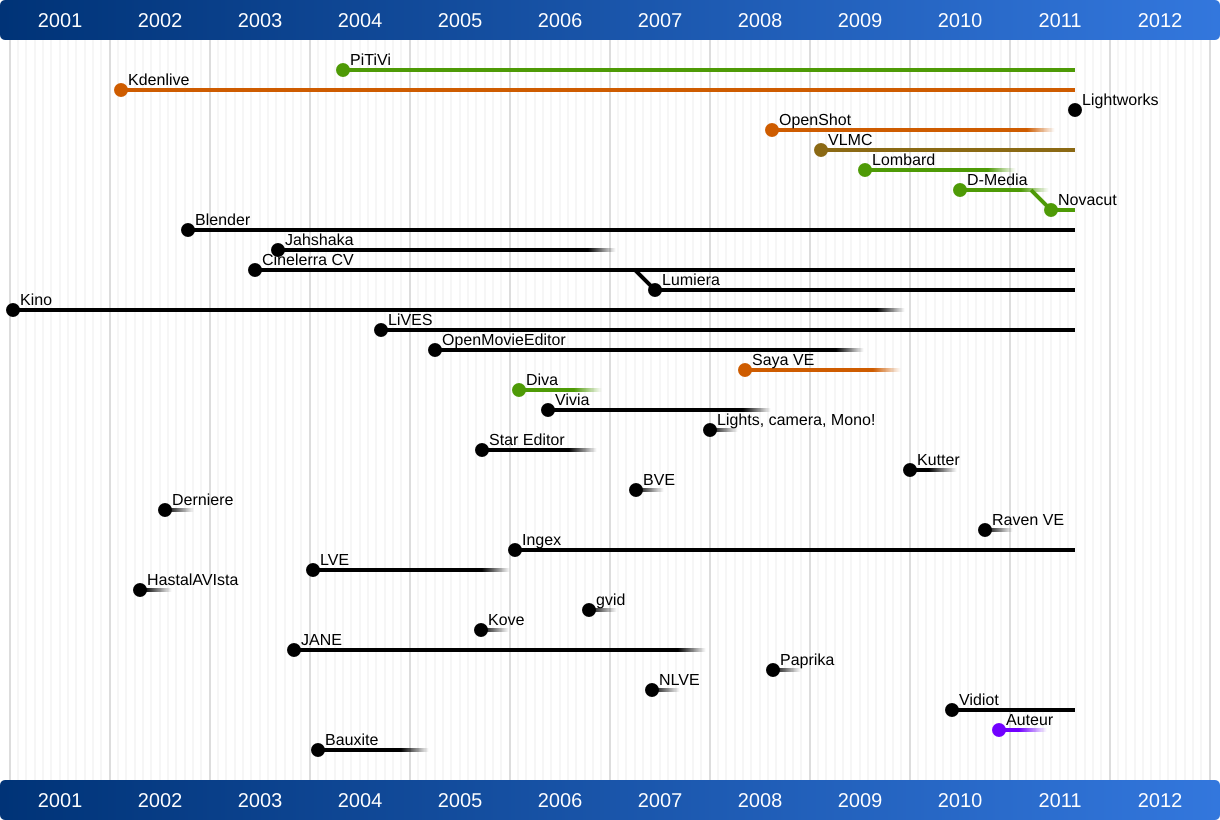
Jeff Fortin (PiTiVi) moderated this session and I was fascinated to later see his analysis of the lifecycle of open source video editors. It is shocking to see how many people/projects have tried to create an open source video editor and how many have stopped their project. It is likely that the creation of a video editor is such a complex challenge that it requires a larger and more committed open source project - single people will just run out of steam too quickly. This may be comparable to the creation of a Web browser (see the size of the Mozilla project) or a text processing system (see the size of the OpenOffice project).
Jeff also mentioned the need to create open video editor standards around playlist file formats etc. Possibly the Open Video Alliance could help. In any case, something has to be done in this space - maybe this would be a good topic to focus next year’s OVC on?
Monday’s Breakout Groups
The conference ended officially on Sunday night, but we had a third day of discussions / hackday at the wonderful New York Lawschool venue. We had collected issues of interest during the two previous days and organised the breakout groups on the morning (Schedule).
In the Content Protection/DRM session, Mark Watson from Netflix explained how their API works and that they believe that all we need in browsers is a secure way to exchange keys and an indicator of protection scheme is used - the actual protection scheme would not be implemented by the browser, but be provided by the underlying system (media framework/operating system). I think that until somebody actually implements something in a browser fork and shows how this can be done, we won’t have much progress. In my understanding, we may also need to disable part of the video API for encrypted content, because otherwise you can always e.g. grab frames from the video element into canvas and save them from there.
In the Playlists and Gapless Playback session, there was massive brainstorming about what new cool things can be done with the video element in browsers if playback between snippets can be made seamless. Further discussions were about a standard playlist file formats (such as XSPF, MRSS or M3U), media fragment URIs in playlists for mashups, and the need to expose track metadata for HTML5 media elements.
What more can I say? It was an amazing three days and the complexity of problems that we’re dealing with is a tribute to how far HTML5 and open video has already come and exciting news for the kind of applications that will be possible (both professional and community) once we’ve solved the problems of today. It will be exciting to see what progress we will have made by next year’s conference.
Thanks go to Google for sponsoring my trip to OVC.
The group has been created to work on many aspects of video text tracks of which captioning and the WebVTT format are key parts.
The main reason behind creating this group is to create a forum at the W3C for working on WebVTT to allow all browsers to support this format and be involved in its development.
We’ve not gone the full way to creating a Working Group, although that was the initial intention. We had objections from W3C members for going down that path, so are using the CG path for now.
This is actually a good thing because CGs are open for anyone to join, while WGs are only open to W3C members. The key difference is that specs coming out of WGs can become RECs (“standards”), while CG’s specs cannot.
If we eventually see a need to move WebVTT to a REC, that move will be straight forward, since there is a clear path for work to transition from a CG to a WG.
Curious about any new requirements that the TV community may have for HTML5 video, I attended the W3C Web and TV Workshop in Hollywood last week. It’s already the third of its kind and was also the largest to date showing an increasing interest of the TV community to converge with the Web community.
The Workshop Aim
I went into the Workshop not quite knowing what to expect. My previous contact with members of this community was restricted to email exchanges on the W3C Web and TV Interest Group (IG) mailing list. I knew there was some interest in video accessibility (well: particularly captions) and little knowledge of existing HTML5 specifications around text tracks and why the browsers were going with WebVTT. So I had decided to attend the workshop to get a better understanding of the community, it’s background, needs, and issues, and to hopefully teach some of the ways of HTML5. For that reason I had also submitted a WebVTT presentation/demo.
As it turned out, the workshop had as its key target the facilitation of communication between the TV and the HTML5 community. The aim was to identify features that need to be added to the HTML5 video element to satisfy the needs of the TV community. I obviously came to the right workshop.
The process that is being used by the W3C in the Interest Group is to have TV community members express their needs, then have HTML5 experts express how these needs can be satisfied with existing HTML5 features, then make trial implementations and identify any shortcomings, then move forward to progress these through HTML5 or HTML.next. This workshop clearly focused on the first step: expressing needs.
Often times it was painful for me to watch presenters defending their requirements and trying to impress on the audience how important a certain feature is to them when that features actually already has a HTML5 specification, but just not yet a browser implementations. That there were so few HTML5 video experts present and that they were given very little space to directly reply to the expressed needs and actually explain what is already possible (or specified to be possible) was probably one of the biggest drawbacks of the workshop.
To be fair, detailed technical discussions were not possible in a room with 150 attendees with a panel sitting at the front discussing topics and taking questions. Solving a use case with existing HTML5 markup and identifying the gaps requires smaller break-out groups of a maximum of maybe 20 people and sufficient HTML5 knowledge in the room. Ultimately they require a single person to try to implement it using JavaScript alone, and, failing that, writing browser extensions. Only such code actually proves that a feature is missing.
Now, the video features of HTML5 are still continuing to change almost on a daily basis. Much development is, for example, happening around real-time communication features and around the track element as we speak. So, focusing on further requirements finding around HTML5 video for now is probably a good thing.
The TV Community Approach
Before I move on to some of the topics covered by the workshop, I have to express some concern about the behaviour that I observed with lots of the TV community folks. Many people tried pushing existing solutions from other spaces into the Web unchanged with a claim of not re-inventing the wheel and following paved cowpaths, which are some of the underlying design principles for HTML5. I can understand where such behaviour originates thinking that having solved the same problems elsewhere before, those solutions should apply here, too. But I would like to warn people of this approach.
If we blindly apply solutions that were not developed for HTML5 into HTML we will end up with suboptimal solutions that will hurt us further down the track. The principles of not re-inventing the wheel and following paved cowpaths were introduced for features that were already implemented by browsers or in de-facto standard use by JavaScript libraries. They were not created for new features in HTML. The video element is a completely new feature in HTML thus everything around it is new.
I would therefore like to see some more respect given to HTML5 and the complexities involved in finding the best possible technical solutions for the Web given that the video element does not stand alone in HTML5, but is part of a much larger picture of technical capabilities on the Web where many of the requested features for TV applications may already be solved by existing HTML markup that is not part of the video element.
Also, HTML5 is not just about the HTML markup, but also about CSS and JavaScript and HTTP. There are several layers of technology involved in creating a Web application: not only a separation of work between client and servers, but also between the Operating System, the media framework, the browser, browser plugins, and JavaScript has to be balanced. To get this balance right is a fine art that will take many discussion, many experiments and sometimes several design approaches. We need patience and calm to work through this, not a rushed adoption of existing solutions from other spaces.
Session 1 / Content Provider and Consumer Perspective:
The sessions participants postulate that we will see the creation of application stores for TV applications similar to how we have experienced this for mobile phones and tablets. People enjoy collecting apps like they collect badges. Right now, the app store domain is dominated by native apps and now Web apps. The reason is that we haven’t got a standard platform for setting up Web app stores with Web apps that work in all browsers on all operating systems. Thus, developers have to re-deploy their app for many environments.
While essentially an orthogonal need to HTML standardisation, this seems to be one of the key issues that keep Web apps back from making big market inroads and W3C may do well in setting up a new WG to define a standard Web app manifest format and JS APIs.
Session 2+3 / Multi-screen TV in the Home Network:
Several technologies of hybrid TV broadcast and set-top-box Web content delivery were being pointed out, including the European HbbTV and the Japanese Hybridcast, the latter of which gave an in-depth demo.
Web purists would probably say that it would be simpler to just deliver all content over the Web and not have to worry about any further technical challenges encountered by having to synchronize content received via two vastly different delivery mechanisms. I personally believe this development is one of business models: we don’t yet know exactly how to earn money from TV content delivered over the Internet, but we do know how to do so with TV content. So, hybrids allow the continuation of existing income streams while allowing the features to be augmented with those people enjoy from the Internet.
Should requirements that emerge from such a use case for HTML5 video be taken seriously? I think they absolutely should. What I see happening is that a new way of using the Web is starting to emerge. The new way is video-focused rather than text-focused. We receive our Web content by watching video programming online - video channels, not Web pages are the core content that we consume in the living room. Video channels are where we start our browsing experience from. Search may still be our first point of call, but it will be search for video content or a video-centric app rather than search for a Web site.
And it will be a matter of many interconnected devices in the house that contribute to the experience: the 5.1 stereos that are spread all over the house and should receive our video’s sound, the different screens in the different areas of our house between which we move around, and remote controls, laptops or tablets that function as remote controls and preview stations and are used to determine our viewing experience and provide a back-channel to the publishers.
We have barely begun to identify how such interconnected devices within a home fit within the server-client-based view of the Web world, and the new Web Sockets functionality. The Home Networking Task Force of the Web and TV IG is looking at the issues and analysing existing protocols and standards that solve this picture. But I have a gnawing feeling that the best solution will be something new that is more Web-specific and fits better with the technology layers of the Web.
Session 4 / Synchronized Metadata:
The TV environment offers many data services, some of which have been legally prescribed. This session analysed TV needs and how they can be satisfied with current HTML5.
Subtitles and closed captioning support are one of the key requirements that have been legally prescribed to allow for equal access of non-native speakers, and blind and vision-impaired users to TV content. After demonstration of some key features defined into the HTML5 track element and the WebVTT format, it was generally accepted that HTML5 is making big progress in this space, in particular that browsers are in the process of implementing support for the track element. A concern still exists for complete coverage of all the CEA-608/708 features in WebVTT.
Further concern was raised for support of audio descriptions and audio translations, in particular since no browser has as yet committed to implementing the HTML5’s media multitrack API with the @mediagroup attribute. In this context I am excited to see first JavaScript polyfills emerge (see captionator.js & mediagroup.js).
Another concern was that many captions are actually delivered as raster images (in particular DVD captions) and how that would work in the Web context. The proposal was to use WebVTT and encode the raster images as data-URIs included in timed cues, then render them by JavaScript as an overlay. This is something to explore further.
Demos were shown using WebVTT to synchronize ads with videos, to display related metadata from a user’s life log with videos, to display thumbnails along a video’s timeline, and to show the rendering of text descriptions through screen readers. General agreement by the panel was that WebVTT offers many opportunities and that this area will continue to need further development and that we will see new capabilities on the Web around metadata that were not previously possible on TV.
Session 5 / Content Format and Codecs: DASH and Codec standards
The introduction of HTTP adaptive streaming into HTML5 was one of the core issues that kept returning in the discussions. This panel focused on MPEG DASH, but also mentioned the need for programmatic implementation of adaptive streaming functionality.
The work around MPEG DASH would require specifications of how to use DASH with WebM and Ogg Theora, as well as a specification of a HTML5 profile for DASH, which would limit the functionality possible in DASH files to the ones needed in a HTML5 video element. One criticism of DASH was its verbosity. Another was its unclear patent position. Panel attendees with included Qualcomm, Apple and Microsoft made very clear that their position is pro a royalty-free use of DASH.
The work around a programmatic implementation for adaptive streaming would require at least a JavaScript API to measure the quality of service of a presented video element and a JavaScript API to feed the video element with chunks of (encrypted) video content on the fly. Interestingly enough, there are existing experiments both around Video metrics and MediaSource extensions, so we can expect some progress in this space, even if these are not yet a strong focus of the HTML WG.
I would personally support the creation of Community Group at the W3C around HTTP adaptive streaming and DASH. I think it would work towards alleviating the perceived patent issues around DASH and allow the right members of the community to participate in preparing a specification for HTML5 without requiring them to become W3C members.
Session 6 / Content Protection and DRM
A core concern of the TV community is around content protection. The requirements in this space seem, however, very confused.
The key assumption here is that Web browsers should support the decoding of DRM-protected content in the HTML5 video element because the video element provides a desirable JavaScript API, accessibility features (the track element), default controls, and the possibility to synchronize multiple media elements. However, at the same time, the video element is part of the core content of a Web page and thus allows direct access to the image content in a canvas etc, so some of its functionality is not desirable.
The picture is further confused by requests for authentication, authorization, encryption, obfuscation, same-origin, secure transmission, secure decryption key delivery, unique content identification and other “content protection” techniques without a clear understanding of what is already possible on the Web and what requirements to content publishers actually have for delivering their content on the Web. This is further complicated by the fact that there are many competing solutions for DRM systems in the market with no clear standard that all browsers could support.
A thorough analysis of the technologies and solutions available in this space as well as an analysis of the needs for HTML5 is required before it becomes clear what solution HTML5 browsers may need to support. There seemed to be agreement in the group, though, that browsers would not need to implement DRM solutions, but rather only hand through the functionality of the platform on which they are running (including the media frameworks and operating system functionalities). How this is supposed to work was, however, unclear.
Session 7 / Web & TV: Additional Device & User Requirements
This was a catch-all session for topics that had not been addressed in other sessions. Among the topics addressed in this group were:
Parental Guidance: how to deal with ratings in an internationally inconsistent ratings landscape, how to deliver the ratings with the content, and how to enforce the viewing restrictions
Emergency Notifications: how to replicate on the Web the emergency notification functionality of TV by providing text overlays to alert users
TV channels: how to detect what channels of programming are available to users
Overall, the workshop was a worthwhile experience. It seems there is a lot of work still ahead for making HTML5 video the best it can be on the Web.
People have been asking me lots of questions about WebVTT (Web Video Text Tracks) recently. Questions about its technical nature such as: are the features included in WebVTT sufficient for broadcast captions including positioning and colors? Questions about its standardisation level: when is the spec officially finished and when will it move from the WHATWG to the W3C? Questions about implementation: are any browsers supporting it yet and how can I make use of it now?
I’m going to answer all of these questions in this post to make it more efficient than answering tweets, emails, and skype and other phone conference requests. It’s about time I do a proper post about it.
Implementations
I’m starting with the last area, because it is the simplest to answer.
No, no browser has as yet shipped support for the
However, you do not have to despair, because there are now a couple of JavaScript polyfill libraries for either just the track element or for video players with track support. You can start using these while you are waiting for the browsers to implement native support for the element and the file format.
Here are some of the libraries that I’ve come across that will support SRT and/or WebVTT (do leave a comment if you come across more):
Captionator - a polyfill for track and SRT parsing (WebVTT in the works)
js_videosub - a polyfill for track and SRT parsing
I am actually most excited about the work of Ronny Mennerich from LeanbackPlayer on WebVTT, since he has been the first to really attack full support of cue settings and to discuss with Ian, me and the WHATWG about their meaning. His review notes with visual description of how settings are to be interpreted and his demo will be most useful to authors and other developers.
Standardisation
Before we dig into the technical progress that has been made recently, I want to answer the question of “maturity”.
The WebVTT specification is currently developed at the WHATWG. It is part of the HTML specification there. When development on it started (under its then name WebSRT), it was also part of the HTML5 specification of the W3C. However, there was a concern that HTML5 should be independent of the chosen captioning format and thus WebVTT currently only exists at the WHATWG.
In recent months - and particularly since browser vendors have indicated that they will indeed implement support for WebVTT as their implementation of the
Many of the new features are about making the WebVTT format more useful for authoring and data management. The introduction of comments, inline CSS settings and default cue settings will help authors reduce the amount of styling they have to provide. File-wide metadata will help with the exchange of management information in professional captioning scenarios and archives.
But even without these new features, WebVTT already has all the features necessary to support professional captioning requirements. I’ve prepared a draft mapping of CEA-608 captions to WebVTT to demonstrate these capabilities (CEA-608 is the TV captioning standard in the US).
So, overall, WebVTT is in a great state for you to start implementing support for it in caption creation applications and in video players. There’s no need to wait any longer - I don’t expect fundamental changes to be made, but only new features to be added.
New WebVTT Features
This takes us straight to looking at the recently introduced new features.
Simpler File Magic: Whereas previously the magic file identifier for a WebVTT file was a single line with “WEBVTT FILE”. This has now been changed to a single line with just “WEBVTT”.
Cue Bold Span: The element has been introduced into WebVTT, thus aligning it somewhat more with SRT and with HTML.
CSS Selectors: The spec already allowed to use the names of tags, the classes of tags, and the voice annotations of tags as CSS selectors for ::cue. ID selector matching is now also available, where the cue identifier is used.
text-decoration support: The spec now also supports the CSS text-decoration property for WebVTT cues, allowing functionality such as blinking text and bold.
Further to this, the email identifies the means in which WebVTT is extensible:
Header area: The WebVTT header area is defined through the “WEBVTT” magic file identifier as a start and two empty lines as an end. It is possible to add into this area file-wide information header information.
Cues: Cues are defined to start with an optional identifier, and then a start/end time specification with ”—>” separator. They end with two empty lines. Cues that contain a ”—>” separator but don’t parse as valid start/end time are currently skipped. Such “cues” can be used to contain inline command blocks.
Inline in cues: Finally, within cues, everything that is within a “tag”, i.e. between "", and does not parse as one of the defined start or end tags is ignored, so we can use these to hide text. Further, text between such start and end tags is visible even if the tags are ignored, so wen can introduce new markup tags in this way.
Given this background, the following V2 extensions have been discussed:
Metadata: Enter name-value pairs of metadata into the header area, e.g.
Inline Cue Settings: Default cue settings can come in a “cue” of their own, e.g.
WEBVTTDEFAULTS --> D:vertical A:end00:00.000 --> 00:02.000This is vertical and end-aligned.00:02.500 --> 00:05.000As is this.DEFAULTS --> A:start00:05.500 --> 00:07.000This is horizontal and start-aligned.
Inline CSS: Since CSS is used to format cue text, a means to do this directly in WebVTT without a need for a Web page and external style sheet is helpful and could be done in its own cue, e.g.
Comments: Both, comments within cues and complete cues commented out are possible, e.g.
WEBVTT

 COMMENT -->
 00:02.000 --> 00:03.000
 two; this is entirely
 commented out

 00:06.000 --> 00:07.000
 this part of the cue is visible
 <! this part isn't >
 <and neither is this>
Finally, I believe we still need to add the following features:
Language tags: I’d like to add a language tag that allows to mark up a subpart of cue text as being in a different language. We need this feature for mixed-language cues (in particular where a different font may be necessary for the inline foreign-language text). But more importantly we will need this feature for cues that contain text descriptions rather than captions, such that a speech synthesizer can pick the correct language model to speak the foreign-language text. It was discussed that this could be done with a xxx type of markup.
Roll-up captions: When we use timestamp objects and the future text is hidden, then is un-hidden upon reaching its time, we should allow the cue text to scroll up a line when the un-hidden text requires adding a new line. This is the typical way in which TV live captions have been displayed and so users are acquainted with this display style.
Inline navigation: For chapter tracks the primary use of cues are for navigation. In other formats - in particular in DAISY-books for blind users - there are hierarchical navigation possibilities within media resources. We can use timestamp objects to provide further markers for navigation within cues, but in order to make these available in a hierarchical fashion, we will need a grouping tag. It would be possible to introduce a
Default caption width: At the moment, the default display size of a caption cue is 100% of the video’s width (height for vertical directions), which can be overruled with the “S” cue setting. I think it should by default rather be the width (height) of the bounding box around all the text inside the cue.
Aside from these changes to WebVTT, there are also some things that can be improved on the . I personally support the introduction of the source element underneath the track element, because that allows us to provide different caption files for different devices through the @media media queries attribute and it allows support for more than just one default captioning format. This change needs to be made soon so we don’t run into trouble with the currently empty track element.
I further think a oncuelistchange event would be nice as well in cases where the number of tracks is somehow changed - in particular when coming from within a media file.
Other than this, I’m really very happy with the state that we have achieved this far.
In the last months, we’ve been working hard at the WHATWG and W3C to spec out new HTML markup and a JavaScript interface for dealing with audio or video content that has more than just one audio and video track.
This is particularly relevant when a Web page author wants to add a sign language track to a video or audio resource for deaf people, or an audio description track (i.e. a sound track in which a speaker explains the key things that can be seen on screen) for blind people. It is also relevant when a Web page author wants to publish a video with multiple audio tracks that are each a different language dub for the video and can be used for less common cases such as a director’s comment track, or making available different camera angles for an event.
Just to be clear: this is not a means to introduce video editing functionality into the Web browser. If you want to do edits, you’re better off with an application that will eventually render a new piece of content and includes fancy transitions etc. Similarly, this is not a means to introduce mixing functionality (as in what DJs do when they play with multiple audio recordings). You’re better off with an actual audio mixing or DJ application that will provide you all sorts of amazing effects and filters.
So, multi-track is squarely focused on synchronizing alternative or additional tracks to a single resource with a single timeline to which all tracks are slaved.
Two means of publishing such multi-track media content are possible:
Of the video file formats that Web browsers support, WebM is currently not defined to contain more than one audio or video track. However, since WebM is using the Matroska container format, which supports multi-track, it is possible to extend WebM for multi-track resources. I have seen multitrack Ogg, MP4 and Matroska files in the wild and most media players support their display.
The specification that has gone into HTML5 to support in-band multi-track looks as follows:
You will notice that every audio and video track gets an index to address them. You can enable and disable individual audio tracks (via the enabled attribute) and you can select a single video track for display (via the selectedIndex attribute). This means that one or more audio tracks can be active at the same time (e.g. main audio and audio description), but only one video track will be active at a time (e.g. main video or sign language).
Through the id, kind, label and language attributes you can find out more about what actual content is available in the individual tracks so as to activate/deactivate them correctly and display the right information about them.
kind identifies the type of content that the track exposes such as “description” (for audio description), “sign” (for sign language), “main” (for the default displayed track), “translation” (for a dubbed audio track), and “alternative” (for an alternative to the default track).
label provides a human readable string that describes the content of the track aiming to be used in a menu.
id provides a short machine-readable string that can be used to construct a media fragment URI for the track. The use case for this will be discussed later.
language provides a machine-readable language code to identify which language is spoken or signed in an audio or sign language video track.
Example 1:
The following uses a video file that has a main video track, a main audio track in English and French, and an audio description track in English and French. (It likely also has caption tracks, but we will ignore text tracks for now.) This code sample switches the French audio tracks on and all other audio tracks off.
The following uses a audio file that has a main audio track in English, no main video track, but sign language video tracks in ASL (American Sign Language), BSL (British Sign Language), and ASF (Australian Sign Language). This code sample switches the Australian sign language track on and all other video tracks off.
If you have more tracks in both examples that conflict with your intentions, you may need to further filter your activation / deactivation code using the kind attribute.
2. Synchronized resources
Sometimes the production process of media creates not a single resource with multiple contained tracks, but multiple resources that all share the same timeline. This is particularly useful for the Web, because it means the user can download only the required resources, typically saving a substantial amount of bandwidth.
For this situation, an attribute called @mediagroup can be added in markup to slave multiple media elements together. This is administrated in the JavaScript API through a MediaController object, which provides events and attributes for the combined multi-track object.
The new IDL interfaces for HTMLMediaElement are as follows:
You will notice that the MediaController replicates some of the states and events of the slave media elements. In general the approach is that the attributes represent the summary state from all the elements and the writable attributes when set are handed through to all the slave elements.
Importantly, if the individual media elements have @controls activated, then the displayed controls interact with the MediaController thus allowing synchronized playback and interaction with the combined multi-track object.
Example 3:
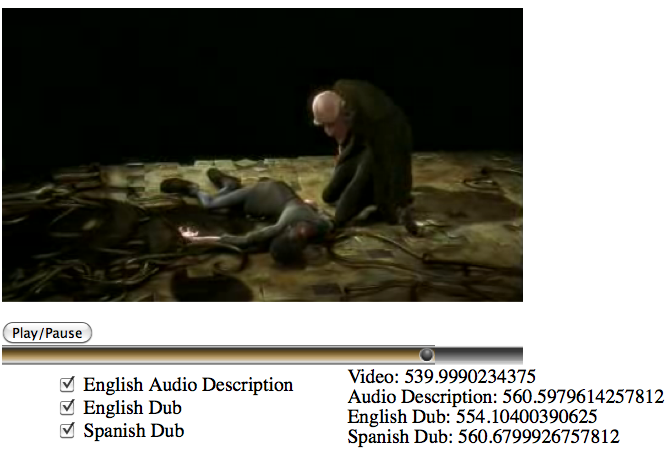
The following uses a video file that has a main video track, a main audio track in English. There is another video file with the ASL sign language for the video, and an audio file with the audio description in English. This code sample creates controls on the first file, which then also control the audio description and the sign language video, neither of which have controls. Since the audio description doesn’t have controls, it doesn’t get visually displayed. The sign language video will just sit next to the main video without controls.
We now accompany a main video with three sign language video tracks in ASL, BSL and ASF. We could just do this in JavaScript and replace the currentSrc of a second video element with the links to BSL and ASF as required, but then we need to run our own media controls to list the available tracks. So, instead, we create a video element for each one of the tracks and use CSS to remove the inactive ones from the page layout. The code sample activates the ASF track and deactivates the other sign language tracks.
In this final example we look at what to do when we have a in-band multi-track resource with multiple video tracks that should all be displayed on screen. This is not a simple problem to solve because a video element is only allowed to display a single video track at a time. Therefore for this problem you need to use both approaches: in-band and synchronized resources.
We take a in-band multitrack resource with a main video and audio track and three sign language tracks in ASL, BSL and ASF. The second resource will be made up from the URI of the first resource with a media fragment address of the sign language tracks. (If required, these can be discovered using the getID() function on the first resource.) The markup will look as follows:
Note that with multiple video elements you can always style them in the way that you want them displayed on screen. E.g. if you want a picture-in-picture display, you scale the second video down and absolutely position it on top of the first one in the appropriate location. You can even grab the second video into a canvas, chroma-key your sign language speaker on a green or blue screen and remove that background through some canvas processing before popping it on top of the video.
The world is all yours!
HOWEVER: There is one big caveat on all these specs - while they have all found entry into the HTML5 specification, it would be expecting a bit much to have browser support already. :-)
UPDATE 23 July 2014: I’ve just changed this to use the latest spec, which should also at least partially be implemented already.
On Wednesday, I gave a talk at Google about WebVTT, the Web Video Text Track file format that is under development at the WHATWG for solving time-aligned text challenges for video.
I started by explaining all the features that WebVTT supports for captions and subtitles, mentioned how WebVTT would be used for text audio descriptions and navigation/chapters, and explained how it is included into HTML5 markup, such that the browser provides some default rendering for these purposes. I also mentioned the metadata approach that allows any timed content to be included into cues.
The talk slides include a demo of how the
The talk was recorded and has been made available as a Google Tech talk with captions and also a separate version with extended audio descriptions.
The slides of the talk are also available (best to choose the black theme).
Working in the WHAT WG and the W3C HTML WG, you sometimes forget that all the things that are being discussed so heatedly for standardization are actually leading to some really exciting new technologies that not many outside have really taken note of yet.
This week, during the Australian Linux Conference in Brisbane, I’ve been extremely lucky to be able to show off some awesome new features that browser vendors have implemented for the audio and video elements. The feedback that I got from people was uniformly plain surprise - nobody expected browser to have all these capabilities.
The examples that I showed off have mostly been the result of working on a book for almost 9 months of the past year and writing lots of examples of what can be achieved with existing implementations and specifications. They have been inspired by diverse demos that people made in the last years, so the book is linking to many more and many more amazing demos.
Incidentally, I promised to give a copy of the book away to the person with the best idea for a new Web application using HTML5 media. Since we ran out of time, please shoot me an email or a tweet (@silviapfeiffer) within the next 4 weeks and I will send another copy to the person with the best idea. The copy that I brought along was given to a student who wanted to use HTML5 video to display on surfaces of 3D moving objects.
I further gave a brief lightning talk about “HTML5 Media Accessibility Update”. I am expecting lots to happen on this topic during this year.
Finally, I gave a presentation today on “The Latest and Coolest in HTML5 Media” with a strong focus on video, but also touching on audio and media accessibility.
The talks were streamed live - congrats to Ryan Verner for getting this working with support from Ben Hutchings from DebConf and the rest of the video team. The videos will apparently be available from http://linuxconfau.blip.tv/ in the near future.
In the past week, I was invited to an IBM workshop on audio/text descriptions for video in Japan. Geoff Freed and Trisha O’Connell from WGBH, and Michael Evans from BBC research were the other invited experts to speak about the current state of video accessibility around the world and where things are going in TV/digital TV and the Web.
The two day workshop was very productive. The first day was spent with presentations which were open to the public. A large vision-impaired community attended to understand where technology is going. It was very humbling to be part of an English-spoken workshop in Japan, where much of the audience is blind, but speaks English much better than my average experience with English in Japan. I met many very impressive and passionate people that are creating audio descriptions, adapting NVDA for the Japanese market, advocating to Broadcasters and Government to create more audio descriptions, and perform fundamental research for better tools to create audio descriptions. My own presentation was on “HTML5 Video Descriptions”.
On the second day, we only met with the IBM researchers and focused discussions on two topics:
How to increase the amount of video descriptions
HTML5 specifications for video descriptions
The first topic included concerns about guidelines for description authoring by beginners, how to raise awareness, who to lobby, and what production tools are required. I personally was more interested in the second topic and we moved into a smaller breakout group to focus on these discussions.
HTML5 specifications for video descriptions Two topics were discussed related to video descriptions: text descriptions and audio descriptions. Text descriptions are descriptions authored as time-aligned text snippets and read out by a screen reader. Audio descriptions are audio recordings either of a human voice or even of a TTS (text-to-speech) synthesis - in either case, they are audio samples.
For a screen reader, the focus was actually largely on NVDA and people were very excited about the availability of this open source tool. There is a concern about how natural-sounding a screen reader can be made and IBM is doing much research there with some amazing results. In user experiment between WGBH and IBM they found that the more natural the voice sounds, the more people comprehend, but between a good screen reader and an actual human voice there is not much difference in the comprehension level. Broadcasters and other high-end producers are unlikely to accept TTS and will prefer the human voice, but for other materials - in particular for the large majority of content on the Web - TTS and screen readers can make a big difference.
An interesting lesson that I learnt was that video descriptions can be improved by 30% (i.e. 30% better comprehension) if we introduce extended descriptions, i.e. descriptions that can pause the main video to allow for a description be read for something that happens in the video, but where there is no obvious pause to read out the description. So, extended descriptions are one of the major challenges to get right.
We then looked at the path that we are currently progressing on in HTML5 with WebSRT, the TimedTrack API, the
For text descriptions we identified a need for the following:
extension marker on cues: often it is very clear to the author of a description cue that there is no time for the cue to be read out in parallel to the main audio and the video needs to be paused. The proposal is for introduction of an extension marker on the cue to pause the video until the screen reader is finished. So, a speech-complete event from the screen reader API needs to be dealt with. To make this reliable, it might make sense to put a max duration on the cue so the video doesn’t end up waiting endlessly in case the screen reader event isn’t fired. The duration would be calculated based on a typical word speaking rate.
importance marker on cues: the duration of all text cues being read out by screen readers depends on the speed set-up of the screen reader. So, even when a cue has been created for a given audio break in the video, it may or may not fit into this break. For most cues it is important that they are read out completely before moving on, but for some it’s not. So, an importance maker could be introduced that determines whether a video stops at the end of the cue to allow the screen reader to finish, or whether the screen reader is silenced at that time no matter how far it has gotten.
ducking during cues: making the main audio track quieter in relation to the video description for the duration of a cue such as to allow the comprehension of the video description cue is important for comprehension
voice hints: an instruction at the beginning of the text description file for what voice to choose such that it won’t collide with e.g. the narrator voice of a video - typically the choice will be for a female voice when the narrator is male and the other way around - this will help initialize the screen reader appropriately
speed hints: an indicator at the beginning of a text description toward what word rate was used as the baseline for the timing of the cue durations such that a screen reader can be initialized with this
synthesis directives: while not a priority, eventually it will make for better quality synchronized text if it is possible to include some of the typical markers that speech synthesizers use (see e.g. SSML or speech CSS), including markers for speaker change, for emphasis, for pitch change and other prosody. It was, in fact, suggested that the CSS3’s speech module may be sufficient in particular since Opera already implements it.
This means we need to consider extending WebSRT cues with an “extension” marker and an “importance” marker. WebSRT further needs header-type metadata to include a voice and a speed hint for screen readers. The screen reader further needs to work more closely with the browser and exchange speech-complete events and hints for ducking. And finally we may need to allow for CSS3 speech styles on subparts of WebSRT cues, though I believe this latter one is not of high immediate importance.
For audio descriptions we identified a need for:
external/in-band descriptions: allowing external or in-band description tracks to be synchronized with the main video. It would be assumed in this case that the timeline of the description track is identical to the main video.
extended external descriptions: since it’s impossible to create in-band extended descriptions without changing the timeline of the main video, we can only properly solve the issue of extended audio descriptions through external resources. One idea that we came up with is to use a WebSRT file with links to short audio recordings as external extended audio descriptions. These can then be synchronized with the video and pause the video at the correct time etc through JavaScript. This is probably a sufficient solution for now. It supports both, sighted and vision-impaired users and does not extend the timeline of the original video. As an optimization, we can also do this through a single “virtual” resource that is a concatenation of the individual audio cues and is addressed through the WebSRT file with byte ranges.
ducking: making the main audio track quieter in relation to the video description for the duration of a cue such as to allow the comprehension of the video description cue is important for comprehension also with audio files, though it may be more difficult to realize
separate loudness control: making it possible for the viewer to separately turn the loudness of an audio description up/down in comparison to the main audio
For audio descriptions, we saw the need for introduction of a multitrack video API and markup to synchronize external audio description tracks with the main video. Extended audio descriptions should be solved through JavaScript and hooking up through the TimedTrack API, so mostly rolling it by hand at this stage. We will see how that develops in future. Ducking and separate loudness controls are equally needed here, but we do need more experiments in this space.
Finally, we discussed general needs to locate accessibility content such as audio descriptions by vision-impaired user:
the need for accessible user menus to turn on/off accessibility content
the introduction of dedicated and standardized keyboard short-cuts to turn on and manipulate the volume of audio descriptions (and captions)
the introduction of user preferences for automatically activating accessibility content; these could even learn from current usage, such that if a user activates descriptions for a video on one Website, the preferences pick this up; different user profiles are already introduced by ISO in “Access for all” and used in websites such as teachersdomain
means to generally locate accessibility content on the web, such as fields in search engines and RSS feeds
more generally there was a request to have caption on/off and description on/off buttons be introduced into remote controls of machines, which will become prevalent with the increasing amount of modern TV/Internet integrated devices
Overall, the workshop was a great success and I am keen to see more experimentation in this space. I also hope that some of the great work that was shown to us at IBM with extended descriptions and text descriptions will become available - if only as screencasts - so we can all learn from it to make better standards and technology.
I wanted to give people an introduction into how to use these elements while at the same time stirring their imagination as to the design possibilities now that these elements are available natively in browsers. I re-used some of the demos that I have put together for the book that I am currently writing, added some of the cool stuff that others have done and finished off with an outlook towards what new features will probably arrive next.
“Slides” are now available, which are really just a Web page with some demos that work in modern browsers.
Today I gave a talk at the Open Video Conference about the state of the specifications in HTML5 for media accessibility.
To be clear: at this exact moment, there is no actual specification text in the W3C version of HTML5 for media accessibility. There is, however, some text in the WHATWG version, providing a framework for text-based alternative content. Other alternative content still requires new specification text. Finally, there is no implementation in any browser yet for media accessibility, but we are getting closer. As browser vendors are moving towards implementing support for the WHATWG specifications of the , the TimedTrack JavaScript API, and the WebSRT format, video sites can also experiment with the provided specifications and contribute feedback to improve the specifications.
Attached are my slides from today’s talk. I went through some of the key requirements of accessibility users and showed how they are being met by the new specifications (in green) or could be met with some still-to-be-developed specifications (in blue). Note that the talk and slides focus on accessibility needs, but the developed technologies will be useful far beyond just accessibility needs and will also help satisfy other needs, such as the needs of internationalization (through subtitles), of exposing multitrack audio/video (through the JavaScript API), of providing timed metadata (through WebSRT), or even of supporting Karaoke (through WebSRT). In the tables on the last two pages I summarize the gaps in the specifications where we will be working on next and also show what is already possible with given specifications.
What I want to do here is to summarize what was introduced, together with the improvements that I and some others have proposed in follow-upemails, and list some of the media accessibility needs that we are not yet dealing with.
For those wanting to only selectively read some sections, here is a clickable table of contents of this rather long blog post:
The first and to everyone probably most surprising part is the new file format that is being proposed to contain out-of-band time-synchronized text for video. A new format was necessary after the analysis of all relevant existing formats determined that they were either insufficient or hard to use in a Web environment.
The new format is called WebSRT and is an extension to the existing SRT SubRip format. It is actually also the part of the new specification that I am personally most uncomfortable with. Not that WebSRT is a bad format. It’s just not sufficient yet to provide all the functionality that a good time-synchronized text format for Web media should. Let’s look at some examples.
WebSRT is composed of a sequence of timed text cues (that’s what we’ve decided to call the pieces of text that are active during a certain time interval). Because of its ancestry of SRT, the text cues can optionally be numbered through. The content of the text cues is currently allowed to contain three different types of text: plain text, minimal markup, and anything at all (also called “metadata”).
In its most simple form, a WebSRT file is just an ordinary old SRT file with optional cue numbers and only plain text in cues:
  1
  00:00:15.00 --> 00:00:17.95
  At the left we can see...

  2
  00:00:18.16 --> 00:00:20.08
  At the right we can see the...

  3
  00:00:20.11 --> 00:00:21.96
  ...the head-snarlers
A bit of a more complex example results if we introduce minimal markup:
  00:00:15.00 --> 00:00:17.95 A:start
  Auf der <i>linken</i> Seite sehen wir...

  00:00:18.16 --> 00:00:20.08 A:end
  Auf der <b>rechten</b> Seite sehen wir die....

  00:00:20.11 --> 00:00:21.96 A:end
  <1>...die Enthaupter.

  00:00:21.99 --> 00:00:24.36 A:start
  <2>Alles ist sicher.
  Vollkommen <b>sicher</b>.
and add to this a CSS to provide for some colors and special formatting:
Minimal markup accepts , , and a timestamp in <>, providing for italics, bold, and ruby markup as well as karaoke timestamps. Any further styling can be done using the CSS pseudo-elements ::cue and ::cue-part, which accept the features ‘color’, ‘text-shadow’, ‘text-outline’, ‘background’, ‘outline’, and ‘font’.
Note that positioning requires some special notes at the end of the start/end timestamps which can provide for vertical text, line position, text position, size and alignment cue setting. Here is an example with vertically rendered Chinese text, right-aligned at 98% of the video frame:
Finally, WebSRT files can be authored with abstract metadata inside cues, which practically means anything at all. Here’s an example with HTML content:
00:00:15.00 --> 00:00:17.95 A:start <img src="pic1.png"/>Auf der <i>linken</i> Seite sehen wir... 00:00:18.16 --> 00:00:20.08 A:end <img src="pic2.png"/>Auf der <b>rechten</b> Seite sehen wir die.... 00:00:20.11 --> 00:00:21.96 A:end <img src="pic3.png"/>...die <a href="http://members.chello.nl/j.kassenaar/elephantsdream/subtitles.html">Enthaupter</a>. 00:00:21.99 --> 00:00:24.36 A:start <img src="pic4.png"/>Alles ist <mark>sicher</mark>.<br/>Vollkommen <b>sicher</b>.
Here is another example with JSON in the cues:
  00:00:00.00 --> 00:00:44.00
  {
    slide: intro.png,
    title: "Really Achieving Your Childhood Dreams" by Randy Pausch,
             Carnegie Mellon University, Sept 18, 2007
  }

  00:00:44.00 --> 00:01:18.00
  {
    slide: elephant.png,
    title: The elephant in the room...
  }

  00:01:18.00 --> 00:02:05.00
  {
    slide: denial.png,
    title: I'm not in denial...
  }
What I like about WebSRT:
it allows for all sorts of different content in the text cues - plain text is useful for texted audio descriptions, minimal markup is useful for subtitles, captions, karaoke and chapters, and “metadata” is useful for, well, any data.
it can be easily encapsulated into media resources and thus turned into in-band tracks by regarding each cue as a data packet with time stamps.
it is not verbose
Where I think WebSRT still needs improvements:
break with the SRT history: since WebSRT and SRT files are so different, WebSRT should get its own MIME type, e.g. text/websrt, and file extensions, e.g. .wsrt; this will free WebSRT for changes that wouldn’t be possible by trying to keep conformant with SRT
introduce some header fields into WebSRT: the format needs
file-wide name-value metadata, such as author, date, copyright, etc
language specification for the file as a hint for font selection and speech synthesis
a possibility for style sheet association in the file header
a means to identify which parser is required for the cues
a magic identifier and a version string of the format
allow innerHTML as an additional format in the cues with the CSS pseudo-elements applying to all HTML elements
allow full use of CSS instead of just the restricted features and also use it for positioning instead of the hard to understand positioning hints
on the minimum markup, provide a neutral structuring element such as <span @id @class @lang> to associate specific styles or specific languages with a subpart of the cue
Note that I undertook some experiments with an alternative format that is XML-based and called WMML to gain most of these insights and determine the advantages/disadvantages of a xml-based format. The foremost advantage is that there is no automatism with newlines and displayed new lines, which can make the source text file more readable. The foremost disadvantages are verbosity and that there needs to be a simple encoding step to remove all encapsulating header-type content from around the timed text cues before encoding it into a binary media resource.
Now that we have a timed text format, we need to be able to associate it with a media resource in HTML5. This is what the was introduced for. It associates the timestamps in the timed text cues with the timeline of the video resource. The browser is then expected to render these during the time interval in which the cues are expected to be active.
Here is an example for how to associate multiple subtitle tracks with a video:
In this case, the UA is expected to provide a text menu with a subtitle entry with these three tracks and their label as part of the video controls. Thus, the user can interactively activate one of the tracks.
Here is an example for multiple tracks of different kinds:
In this case, the UA is expected to provide a text menu with a list of track kinds with one entry each for subtitles, captions and descriptions through the controls. The chapter tracks are expected to provide some sort of visual subdivision on the timeline and the metadata tracks are not exposed visually, but are only available through the JavaScript API.
Here are several ideas for improving the
karaoke and lyrics are supported by WebSRT, but aren’t in the HTML5 spec as track kinds - they should be added and made visible like subtitles or captions.
This is where we take an extra step and move to a uniform handling of both in-band and out-of-band timed text tracks. Futher, a third type of timed text track has been introduced in the form of a MutableTimedTrack - i.e. one that can be authored and added through JavaScript alone.
The JavaScript API that is exposed for any of these track type is identical. A media element now has this additional IDL interface:
interface HTMLMediaElement : HTMLElement {... readonly attribute TimedTrack[] tracks; MutableTimedTrack addTrack(in DOMString label, in DOMString kind, in DOMString language);};
A media element thus manages a list of TimedTracks and provides for adding TimedTracks through addTrack().
The timed tracks are associated with a media resource in the following order:
The
Tracks created through the addTrack() method, in the order they were added, oldest first.
In-band timed text tracks, in the order defined by the media resource’s format specification.
The IDL interface of a TimedTrack is as follows:
interface TimedTrack { readonly attribute DOMString kind; readonly attribute DOMString label; readonly attribute DOMString language; readonly attribute unsigned short readyState; attribute unsigned short mode; readonly attribute TimedTrackCueList cues; readonly attribute TimedTrackCueList activeCues; readonly attribute Function onload; readonly attribute Function onerror; readonly attribute Function oncuechange;};
The first three capture the value of the @kind, @label and @srclang attributes and are provided by the addTrack() function for MutableTimedTracks and exposed from metadata in the binary resource for in-band tracks.
The readyState captures whether the data is available and is one of “not loaded”, “loading”, “loaded”, “failed to load”. Data is only availalbe in “loaded” state.
The mode attribute captures whether the data is activate to be displayed and is one of “disabled”, “hidden” and “showing”. In the “disabled” mode, the UA doesn’t have to download the resource, allowing for some bandwidth management.
The cues and activeCues attributes provide the list of parsed cues for the given track and the subpart thereof that is currently active.
The onload, onerror, and oncuechange functions are event handlers for the load, error and cuechange events of the TimedTrack.
Individual cues expose the following IDL interface:
The @track attribute links the cue to its TimedTrack.
The @id, @startTime, @endTime attributes expose a cue identifier and its associated time interval. The getCueAsSource() and getCueAsHTML() functions provide either an unparsed cue text content or a text content parsed into a HTML DOM subtree.
The @pauseOnExit attribute can be set to true/false and indicates whether at the end of the cue’s time interval the media playback should be paused and wait for user interaction to continue. This is particularly important as we are trying to support extended audio descriptions and extended captions.
The onenter and onexit functions are event handlers for the enter and exit events of the TimedTrackCue.
The @direction, @snapToLines, @linePosition, @textPosition, @size, @alignment and @voice attributes expose WebSRT positioning and semantic markup of the cue.
My only concerns with this part of the specification are:
The WebSRT-related attributes in the TimedTrackCue are in conflict with CSS attributes and really should not be introduced into HTML5, since they are WebSRT-specific. They will not exist in other types of in-band or out-of-band timed text tracks. As there is a mapping to do already, why not rely on already available CSS features.
There is no API to expose header-specific metadata from timed text tracks into JavaScript. This such as the copyright holder, the creation date and the usage rights of a timed text track would be useful to have available. I would propose to add a list of name-value metadata elements to the TimedTrack API.
In addition, I would propose to allow media fragment hyperlinks in a
The third part of the timed track framework deals with how to render the timed text cues in a Web page. The rendering rules are explained in the HTML5 rendering section.
I’ve extracted the following rough steps from the rendering algorithm:
All timed tracks of a media resource that are in “showing” mode are rendered together to avoid overlapping text from multiple tracks.
The timed tracks cues that are to be rendered are collected from the active timed tracks and ordered by the timed track order first and by their start time second. Where there are identical start times, the cues are ordered by their end time, earliest first, or by their creation order if all else is identical.
Each cue gets its own CSS box.
The text in the CSS boxes is positioned and formated by interpreting the positioning and formatting instructions of WebSRT that are provided on the cues.
An anonymous inline CSS box is created into which all the cue CSS boxes are wrapped.
The wrapping CSS box gets the dimensions of the video viewport. The cue CSS boxes are positioned so they don’t overlap. The text inside the cue CSS boxes inside the wrapping CSS box is wrapped at the edges if necessary.
To overcome security concerns with this kind of direct rendering of a CSS box into the Web page where text comes potentially from a different and malicious Web site, it is required to have the cues come from the same origin as the Web page.
To allow application of a restricted set of CSS properties to the timed text cues, a set of pseudo-selectors was introduced. This is necessary since all the CSS boxes are anonymous and cannot be addressed from the Web page. The introduced pseudo-selectors are ::cue to address a complete cue CSS box, and ::cue-part to address a subpart of a cue CSS box based on a set of identifiers provided by WebSRT.
I have several issues with this approach:
I believe that it is not a good idea to only restrict rendering to same-origin files. This will disallow the use of external captioning services (or even just a separate caption server of the same company) to link to for providing the captions to a video. Henri Sivonen proposed a means to overcome this by parsing every cue basically as its own HTML document (well, the body of a document) and then rendering these in iFrame-manner into the Web page. This would overcome the same-origin restriction. It would also allow to do away with the new ::cue CSS selectors, thus simplifying the solution.
In general I am concerned about how tightly the rendering is tied to WebSRT. Step 4 should not be in the HTML5 specification, but only apply to WebSRT. Every external format should provide its own mapping to CSS. As it is specified right now, other formats, such as e.g. 3GPP in MPEG-4 or Kate in Ogg, are required to map their format and positioning information to WebSRT instructions. These are then converted again using the WebSRT to CSS mapping rules. That seems overkill.
I also find step 6 very limiting, since only the video viewport is regarded as a potential rendering area - this is also the reason why there is no rendering for audio elements. Instead, it would make a lot more sense if a CSS box was provided by the HTML page - the default being the video viewport, but it could be changed to any area on screen. This would allow to render music lyrics under or above an audio element, or render captions below a video element to avoid any overlap at all.
SUMMARY AND FURTHER NEEDS
We’ve made huge progress on accessibility features for HTML5 media elements with the specifications that Ian proposed. I think we can move it to a flexible and feature-rich framework as the improvements that Henri, myself and others have proposed are included.
However, we are not solving any of the accessibility needs that relate to alternative audio-visual tracks and resources. In particular there is no solution yet to deal with multi-track audio or video files that have e.g. sign language or audio description tracks in them - not to speak of the issues that can be introduced through dealing with separate media resources from several sites that need to be played back in sync. This latter may be a challenge for future versions of HTML5, since needs for such synchoronisation of multiple resources have to be explored further.
In a first instance, we will require an API to expose in-band tracks, a means to control their activation interactively in a UI, and a description of how they should be rendered. E.g. should a sign language track be rendered as pciture-in-picture? Clear audio and Sign translation are the two key accessibility needs that can be satisfied with such a multi-track solution.
Finally, another key requirement area for media accessibility is described in a section called “Content Navigation by Content Structure”. This describes the need for vision-impaired users to be able to navigate through a media resource based on semantic markup - think of it as similar to a navigation through a book by book chapters and paragraphs. The introduction of chapter markers goes some way towards satisfying this need, but chapter markers tend to address only big time intervals in a video and don’t let you navigate on a different level to subchapters and paragraphs. It is possible to provide that navigation through providing several chapter tracks at different resolution levels, but then they are not linked together and navigation cannot easily swap between resolution levels.
An alternative might be to include different resolution levels inside a single chapter track and somehow control the UI to manage them as different resolutions. This would only require an additional attribute on text cues and could be useful to other types of text tracks, too. For example, captions could be navigated based on scenes, shots, coversations, or individual captions. Some experimentation will be required here before we can introduce a sensible extension to the given media accessibility framework.
For 2 months now, I have been quietly working along on a new Mozilla contract that I received to continue working on HTML5 media accessibility. Thanks Mozilla!
Lots has been happening - the W3C HTML5 accessibility task force published a requirements document, the Media Text Associations proposal made it into the HTML5 draft as a , and there are discussions about the advantages and disadvantages of the new WebSRT caption format that Ian Hickson created in the WHATWG HTML5 draft.
The first three now already have first drafts in the HTML5 specification, though the details still need to be improved and an external text track file format agreed on. The last has had a major push ahead with the Media Fragments WG publishing a Last Call Working Draft. So, on the specification side of things, major progress has been made. On the implementation - even on the example implementation - side of things, we still fall down badly. This is where my focus will lie in the next few months.
In recent months, people in the W3C HTML5 Accessibility Task Force developed two proposals for introducing caption, subtitle, and more generally time-aligned text support into HTML5 audio and video.
These time-aligned text files can either come as external files that are associated with the timeline of the media resource, or they come as part of the media resource in a binary track.
For both cases we now have proposals to extend the HTML5 specification.
Firstly, let’s look at time-aligned text in external files. The change proposal introduces markup to associate such external files as a kind of “virtual track” with a media resource. Here is an example: <video src="video.ogv"> <track src="video_cc.ttml" type="application/ttaf+xml" language="en" role="caption"></track> <track src="video_tad.srt" type="text/srt" language="en" role="textaudesc"></track> <trackgroup role="subtitle"> <track src="video_sub_en.srt" type="text/srt; charset='Windows-1252'" language="en"></track> <track src="video_sub_de.srt" type="text/srt; charset='ISO-8859-1'" language="de"></track> <track src="video_sub_ja.srt" type="text/srt; charset='EUC-JP'" language="ja"></track> </trackgroup> </video> The video resource is “video.ogv”. Associated with it are five timed text resources.
The first one is written in TTML (which is the new name for DFXP), is a caption track and in English. TTML is particularly useful when you want to provide more than just an unformatted piece of text to the viewers. Hearing-impaired users appreciate any visual help they can be provided with to absorb the caption text more quickly. This includes colour coding of speakers, positioning of text close to the speaking person on screen, or even animated musical notes to signify music. Thus, a format like TTML that allows for formatting and positioning information is an appropriate format to specify captions.
All other timed text resources are provided in SRT format, which is a simpler format that TTML with only plain text in the text cues.
The second text track is a textual audio description track. A textual audio description is in fact targeted at the vision-impaired and contains text that is expected to be read out by a screen reader or routed to a braille device. Thus, as the video plays, a vision-impaired user receives additional information about the visual content of the scene through their screen reader or braille device. The SRT format is particularly useful for providing textual audio descriptions since it only provides plain text, which can easily be handed on to assistive technology. When authoring such textual audio descriptions, it is very important to pick time intervals in the original media resource where no other significant audio cue is provided, such that the vision-impaired user is able to listen to the screen reader during that time.
The last three text tracks are subtitle tracks. They are grouped into a trackgroup element, which is not strictly necessary, but enables the author to say that these tracks are supposed to be alternatives. Thus, a Web Browser can create a menu with all the available tracks and put the tracks in the trackgroup into a menu of their own where only one option is selectable (similar to how radiobuttons work). Incidentally, the trackgroup element also allows to avoid having to repeat the role attribute in all the containing tracks. It is expected that these menus will be added to the default media controls and will thus be visible if the media element has a controls attribute.
With the role, type and language attributes, it is easy for a Web Browser to understand what the different tracks have to offer. A Web Browser can even decide to offer new functionality that is helpful to certain user groups. For example, an addition to a Web Browser’s default settings could be to allow users to instruct a Web Browser to always turn on captions or subtitles if they are available in the user’s main language. Or to always turn on textual audio descriptions. In this way, a user can customise their default experience of a media resource over and on top of what a Web page author decides to expose.
Incidentally, the choice of “track” as a name for relating external text resources to a media element has a deeper meaning. It is easily possible in future to extend “track” elements to not just point to dependent text resources, but also to dependent audio or video resources. For example, an actual audio description that is a recording of a human voice rather than a rendered text description could be association in the same way. Right now, such an implementation is not envisaged by the Browser vendors, but it will be something to work towards in the future.
Now, with such functionality available, there is naturally a desire to be able to control activation or de-activation of text tracks through JavaScript, not just through user interaction. A Web Developer may for example want to override the default controls provided by a Web Browser and run their own JavaScript-based controls, thus requiring to create their own selection menu for the tracks.
This is actually also an issue more generally and applies to all track types, including such tracks that come inside an existing media resource. In the current specification such tracks are not exposed and can therefore not be activated.
This is where the second specification that the W3C Accessibility Task Force has worked towards comes in: the media multitrack JavaScript API.
This specification introduces a read-only JavaScript interface to the audio and video elements to allow Web Developers to find out about the tracks (including the virtual tracks) that a media resource offers. The only action that the interface currently provides is to enable or disable tracks. Here is an example use to turn on a french subtitle track: if (video.tracks[2].role == "subtitle" && video.tracks[2].language == "fr") video.tracks[2].enabled = true;
There is still a need to introduce a means to actually expose the text cues as they relate to the currentTime of the media resource. This has not yet been specified in the given proposals.
The text cues could be exposed in several ways. They could be exposed through introducing an event, i.e. every time a new text cue becomes active, a callback is called which is given the active text cue (if such a callback had been registered previously). Another option is to simply write the text cues into a specified div-element in the DOM and thus expose them directly in the Browser. A third idea could be to expose the text cues in an iframe-like element to avoid any cross-site security issues. And a fourth idea that we have discussed is to expose the text cues in an attribute of the track.
All of this obviously also relates to how to actually render the text cues and whether to render them in a shadow DOM so as to make the JavaScript reading separate from the rendering and address security and copyright issues. I’d be curious in opinions here on how it should be done.
Today, I was invited to give a talk at my old workplace CSIRO about the HTML5 media elements and accessibility.
A lot of the things that have gone into Ogg and that are now being worked on in the W3C in different working groups - including the Media Fragments and HTML5 WGs - were also of concern in the Annodex project that I worked on while at CSIRO. So I was rather excited to be able to report back about the current status in HTML5 and where we’re at with accessibility features.
Check out the presentation here. It contains a good collection of links to exciting demos of what is possible with the new HTML5 media elements when combined with other HTML features.
I tried something now with this presentation: I wrote it in a tool called S5, which makes use only of HTML features for the presentation. It was quite a bit slower than I expected, e.g. reloading a page always included having to navigate to that page. Also, it’s not easily possible to do drawings, unless you are willing to code them all up in HTML. But otherwise I have found it very useful for, in particular, including all the used URLs and video element demos directly in the slides. I was inspired with using this tool by Chris Double’s slides from LCA about implementing HTML 5 video in Firefox.
At the recent FOMS/LCA in Wellington, New Zealand, we talked a lot about how Ogg could support accessibility. Technically, this means support for multiple text tracks (subtitles/captions), multiple audio tracks (audio descriptions parallel to main audio track), and multiple video tracks (sign language video parallel to main video track).
Creating multitrack Ogg files The creation of multitrack Ogg files is already possible using one of the muxing applications, e.g. oggz-merge. For example, I have my own little collection of multitrack Ogg files at http://annodex.net/~silvia/itext/elephants_dream/multitrack/. But then you are stranded with files that no player will play back.
Multitrack Ogg in Players As Ogg is now being used in multiple Web browsers in the new HTML5 media formats, there are in particular requirements for accessibility support for the hard-of-hearing and vision-impaired. Either multitrack Ogg needs to become more of a common case, or the association of external media files that provide synchronised accessibility data (captions, audio descriptions, sign language) to the main media file needs to become a standard in HTML5.
As it turn out, both these approaches are being considered and worked on in the W3C. Accessibility data that are audio or video tracks will in the near future have to come out of the media resource itself, but captions and other text tracks will also be available from external associated elements.
The availability of internal accessibility tracks in Ogg is a new use case - something Ogg has been ready to do, but has not gone into common usage. MPEG files on the other hand have for a long time been used with internal accessibility tracks and thus frameworks and players are in place to decode such tracks and do something sensible with them. This is not so much the case for Ogg.
For example, a current VLC build installed on Windows will display captions, because Ogg Kate support is activated. A current VLC build on any other platform, however, has Ogg Kate support deactivated in the build, so captions won’t display. This will hopefully change soon, but we have to look also beyond players and into media frameworks - in particular those that are being used by the browser vendors to provide Ogg support.
Multitrack Ogg in Browsers Hopefully gstreamer (which is what Opera uses for Ogg support) and ffmpeg (which is what Chrome uses for Ogg support) will expose all available tracks to the browser so they can expose them to the user for turning on and off. Incidentally, a multitrack media JavaScript API is in development in the W3C HTML5 Accessibility Task Force for allowing such control.
The current version of Firefox uses liboggplay for Ogg support, but liboggplay’s multitrack support has been sketchy this far. So, Viktor Gal - the liboggplay maintainer - and I sat down at FOMS/LCA to discuss this and Viktor developed some patches to make the demo player in the liboggplay package, the glut-player, support the accessibility use cases.
I applied Viktor’s patch to my local copy of liboggplay and I am very excited to show you the screencast of glut-player playing back a video file with an audio description track and an English caption track all in sync:
Further developments There are still important questions open: for example, how will a player know that an audio description track is to be played together with the main audio track, but a dub track (e.g. a German dub for an English video) is to be played as an alternative. Such metadata for the tracks is something that Ogg is still missing, but that Ogg can be extended with fairly easily through the use of the Skeleton track. It is something the Xiph community is now working on.
Summary This is great progress towards accessibility support in Ogg and therefore in Web browsers. And there is more to come soon.
I have talked a lot about synchronising multiple tracks of audio and video content recently. The reason was mainly that I foresee a need for more than two parallel audio and video tracks, such as audio descriptions for the vision-impaired or dub tracks for internationalisation, as well as sign language tracks for the hard-of-hearing.
It is almost impossible to introduce a good scheme to deliver the right video composition to a target audience. Common people will prefer bare a/v, vision-impaired would probably prefer only audio plus audio descriptions (but will probably take the video), and the hard-of-hearing will prefer video plus captions and possibly a sign language track . While it is possible to dynamically create files that contain such tracks on a server and then deliver the right composition, implementation of such a server method has not been very successful in the last years and it would likely take many years to roll out such new infrastructure.
So, the only other option we have is to synchronise completely separate media resource together as they are selected by the audience.
I created a Ogg video with only a video track (10m53s750). Then I created an audio track that is the original English audio track (10m53s696). Then I used a Spanish dub track that I found through BlenderNation as an alternative audio track (10m58s337). Lastly, I created an audio description track in the original language (10m53s706). This creates a video track with three optional audio tracks.
I took away all native controls from these elements when using the HTML5 audio and video tag and ran my own stop/play and seeking approaches, which handled all media elements in one go.
I was mostly interested in the quality of this experience. Would the different media files stay mostly in sync? They are normally decoded in different threads, so how big would the drift be?
The resulting page is the basis for such experiments with synchronisation.
The page prints the current playback position in all of the media files at a constant interval of 500ms. Note that when you pause and then play again, I am re-synching the audio tracks with the video track, but not when you just let the files play through.
I have let the files play through on my rather busy Macbook and have achieved the following interesting drift over the course of about 9 minutes:
You will see that the video was the slowest, only doing roughly 540s, while the Spanish dub did 560s in the same time.
To fix such drifts, you can always include regular re-synchronisation points into the video playback. For example, you could set a timeout on the playback to re-sync every 500ms. Within such a short time, it is almost impossible to notice a drift. Don’t re-load the video, because it will lead to visual artifacts. But do use the video’s currentTime to re-set the others. (UPDATE: Actually, it depends on your situation, which track is the best choice as the main timeline. See also comments below.)
It is a workable way of associating random numbers of media tracks with videos, in particular in situations where the creation of merged files cannot easily be included in a workflow.
In the previous post I explained that there is a need to expose the tracks of a time-linear media resource to the user agent (UA). Here, I want to look in more detail at different possibilities of how to do so, their advantages and disadvantages.
Note: A lot of this has come out of discussions I had at the recent W3C TPAC and is still in flux, so I am writing this to start discussions and brainstorm.
Declarative Syntax vs JavaScript API
We can expose a media resource’s tracks either through a JavaScript function that can loop through the tracks and provide access to the tracks and their features, or we can do this through declarative syntax.
Using declarative syntax has the advantage of being available even if JavaScript is disabled in a UA. The markup can be parsed easily and default displays can be prepared without having to actually decode the media file(s).
OTOH, it has the disadvantage that it may not necessarily represent what is actually in the binary resource, but instead what the Web developer assumed was in the resource (or what he forgot to update). This may lead to a situation where a “404” may need to be given on a media track.
A further disadvantage is that when somebody copies the media element onto another Web page, together with all the track descriptions, and then the original media resource is changed (e.g. a subtitle track is added), this has not the desired effect, since the change does not propagate to the other Web page.
For these reasons, I thought that a JavaScript interface was preferable over declarative syntax.
However, recent discussions, in particular with some accessibility experts, have convinced me that declarative syntax is preferable, because it allows the creation of a menu for turning tracks on/off without having to even load the media file. Further, declarative syntax allows to treat multiple files and “native tracks” of a virtual media resource in an identical manner.
Extending Existing Declarative Syntax
The HTML5 media elements already have declarative syntax to specify multiple source media files for media elements. The element is typically used to list video in mpeg4 and ogg format for support in different browsers, but has also been envisaged for different screensize and bandwidth encodings.
The elements are generally meant to list different resources that contribute towards the media element. In that respect, let’s try using it for declaring a manifest of tracks of the virtual media resource on an example:
Note that this somewhat ignores my previously proposed special itext tag for handling text tracks. I am doing this here to experiment with a more integrative approach with the virtual media resource idea from the previous post. This may well be a better solution than a specific new text-related element. Most of the attributes of the itext element are, incidentally, covered.
You will also notice that some of the tracks are references to tracks inside binary media files using the Media Fragment URI specification while others link to full files. An example is video.ogv?track=auddesc[en]. So, this is a uniform means of exposing all the tracks that are part of a (virtual) media resource to the UA, no matter whether in-band or in external files. It actually relies on the UA or server being able to resolve these URLs.
”type” attribute
“media” and “type” are existing attributes of the element in HTML5 and meant to help the UA determine what to do with the referenced resource. The current spec states:
The “type” attribute gives the type of the media resource, to help the user agent determine if it can play this media resource before fetching it.
The word “play” might need to be replaced with “decode” to cover several different MIME types.
The “type” attribute was also extended with the possibility to add the “charset” MIME parameter of a linked text resource - this is particularly important for SRT files, which don’t handle charsets very well. It avoids having to add an additional attribute and is analogous to the “codecs” MIME parameter used by audio and video resources.
”media” attribute
Further, the spec states:
The “media” attribute gives the intended media type of the media resource, to help the user agent determine if this media resource is useful to the user before fetching it. Its value must be a valid media query.
The “mobile” and “desktop” values are hints that I’ve used for simplicity reasons. They could be improved by giving appropriate bandwidth limits and width/height values, etc. Other values could be different camera angles such as topview, frontview, backview. The media query aspect has to be looked into in more depth.
”lang” attribute
The above example further uses “lang” and “role” attributes:
The “lang” attribute is an existing global attribute of HTML5, which typically indicates the language of the data inside the element. Here, it is used to indicate the language of the referenced resource. This is possibly not quite the best name choice and should maybe be called “hreflang”, which is already used in multiple other elements to signify the language of the referenced resource.
”role” attribute
The “role” attribute is also an existing attribute in HTML5, included from ARIA. It currently doesn’t cover media resources, but could be extended. The suggestion here is to specify the roles of the different media tracks - the ones I have used here are:
“media”: a main media resource - typically contains audio and video and possibly more
“dub”: a audio track that provides an alternative dubbed language track
“auddesc”: a audio track that provides an additional audio description track
“caption”: a text track that provides captions
“sign”: a video-only track that provides an additional sign language video track
“tad”: a text track that provides textual audio descriptions to be read by a screen reader or a braille device
Further roles could be “music”, “speech”, “sfx” for audio tracks, “subtitle”, “lyrics”, “annotation”, “chapters”, “overlay” for text tracks, and “alternate” for a alternate main media resource, e.g. a different camera angle.
Track activation
The given attributes help the UA decide what to display.
It will firstly find out from the “type” attribute if it is capable of decoding the track.
Then, the UA will find out from the “media” query, “role”, and “lang” attributes whether a track is relevant to its user. This will require checking the capabilities of the device, network, and the user preferences.
Further, it could be possible for Web authors to influence whether a track is displayed or not through CSS parameters on the element: “display: none” or “visibility: hidden/visible”.
Examples for track activation that a UA would undertake using the example above:
Given a desktop computer with Firefox, German language preferences, captions and sign language activated, the UA will fetch the original video at video.ogv (for Firefox), the German caption track at video.ogv?track=caption[de], and the German sign language track at signvid_gsg.ogv (maybe also the German dubbed audio track at video.ogv?track=audio[de], which would then replace the original one).
Given a desktop computer with Safari, English language preferences and audio descriptions activated, the UA will fetch the original video at video.mp4 (for Safari) and the textual audio description at tad_en.srt to be displayed through the screen reader, since it cannot decode the Ogg audio description track at video.ogv?track=auddesc[en].
Also, all decodeable tracks could be exposed in a right-click menu and added on-demand.
Display styling
Default styling of these tracks could be:
video or alternate video in the video display area,
sign language probably as picture-in-picture (making it useless on a mobile and only of limited use on the desktop),
captions/subtitles/lyrics as overlays on the bottom of the video display area (or whatever the caption format prescribes),
textual audio descriptions as ARIA live regions hidden behind the video or off-screen.
Multiple audio tracks can always be played at the same time.
The Web author could also define the display area for a track through CSS styling and the UA would then render the data into that area at the rate that is required by the track.
How good is this approach?
The advantage of this new proposal is that it builds basically on existing HTML5 components with minimal additions to satisfy requirements for content selection and accessibility of media elements. It is a declarative approach to the multi-track media resource challenge.
However, it leaves most of the decision on what tracks are alternatives of/additions to each other and which tracks should be displayed to the UA. The UA makes an informed decision because it gets a lot of information through the attributes, but it still has to make decisions that may become rather complex. Maybe there needs to be a grouping level for alternative tracks and additional tracks - similar to what I did with the second itext proposal, or similar to the and elements of SMIL.
A further issue is one that is currently being discussed within the Media Fragments WG: how can you discover the track composition and the track naming/uses of a particular media resource? How, e.g., can a Web author on another Web site know how to address the tracks inside your binary media resource? A HTML specification like the above can help. But what if that doesn’t exist? And what if the file is being used offline?
Alternative Manifest descriptions
The need to manifest the track composition of a media resource is not a new one. Many other formats and applications had to deal with these challenges before - some have defined and published their format.
I am going to list a few of these formats here with examples. They could inspire a next version of the above proposal with grouping elements.
Microsoft ISM files (SMIL subpart)
With the release of IIS7, Microsoft introduced “Smooth Streaming”, which uses chunking on files on the server to deliver adaptive streaming to Silverlight clients over HTTP. To inform a smooth streaming client of the tracks available for a media resource, Microsoft defined ism files: IIS Smooth Streaming Server Manifest files.
This is a short example - a longer one can be found here:
The feedback has encouraged me to develop a new specification that includes the concerns and makes it easier to associate out-of-band time-aligned text (i.e. subtitles stored in separate files to the video/audio file). A simple example of the new specification using srt files is this:
By default, the charset of the itext file is UTF-8, and the default format is text/srt (incidentally a mime type the still needs to be registered). Also by default the browser is expected to select for display the track that matches the set default language of the browser. This has been proven to work well in the previous experiments.
Check out the new itext specification, read on to get an introduction to what has changed, and leave me your feedback if you can!
The itextlist element You will have noticed that in comparison to the previous specification, this specification contains a grouping element called “itextlist”. This is necessary because we have to distinguish between alternative time-aligned text tracks and ones that can be additional, i.e. displayed at the same time. In the first specification this was done by inspecting each itext element’s category and grouping them together, but that resulted in much repetition and unreadable specifications.
Also, it was not clear which itext elements were to be displayed in the same region and which in different ones. Now, their styling can be controlled uniformly.
The final advantage is that association of callbacks for entering and leaving text segments as extracted from the itext elements can now be controlled from the itextlist element in a uniform manner.
This change also makes it simple for a parser to determine the structure of the menu that is created and included in the controls element of the audio or video element.
Incidentally, a patch for Firefox already exists that makes this part of the browser. It does not yet support this new itext specification, but here is a screenshot that Felipe Corr
As part of my experiments in video accessibility I am also looking at the audio element. I have just finished a proof of concept for parsing Lyrics files for music in lrc format.
Since working on video accessibility, I have felt rather inadequate not knowing exactly how general Web accessibility works, in particular ARIA. I have been pointed at the W3C WAI-ARIA primer, best practices, and WD specification, but found them almost impossible to read.
If you are looking for a document that gets right to the point, I can recommend Opera’s Introduction to WAI ARIA. It tells you what attributes there are and how to use them. More in-depth information is available in the W3C WAI-ARIA best practices. Here’s my little summary of what I learnt.
Getting straight to the point: ARIA mostly cares about giving screen control to the keyboard (away from the mouse) and about exposing semantic information, such that vision-impaired people have a way to interact with Web content and screen readers can read out useful information.
Basic keys The basic keys in use for accessibility are the tab/shift+tab, arrow, enter, space and escape keys.
Keyboard Focus: tabbing Normal tabbing includes form controls and anchors. This can be overruled with the tabindex attribute.
Adding a tabindex=0 to an element adds the element to the tab order in which it appears in the document. Adding a tabindex out of [1;32767] you can place any element into a desired order - lowest numbers first.
Adding a tabindex=-1 to an element removes it from tabbing order, but you can still get keyboard focus onto it through javascript, e.g. for the subelements of a menu. The aria-activedescendant attribute can tell which is active in a list of descendants.
Navigation Landmarks: roles Screenreaders have a problem with expressing what the functionality of elements is - normally they can only read out the name of the element.
This is where the role attribute comes in. It provides semantic meaning, e.g. “slider” instead of “input” element.
ARIA has a large number of pre-defined roles. They are listed in the spec - each role has additional attributes to provide more assistive information - mostly state information on the particular element.
Live updated content: aria-live When data is updated somewhere on screen, often assistive technology doesn’t get to know about it.
Regions that are marked with the aria-live attribute will be read out even if the user is focused on another part of the screen at that point.
Form input: aria-reqired For screen readers it is not obvious if a form element’s entry is a required or optional entry. Add an aria-required attribute to the form entry element and your screen reader will tell you.
Labels and descriptions: aria-labelledby / aria-describedby Most often the description or label for a page area sits already elsewhere on screen, but with no obivous relationship to an element other than visible neighbourship.
A screenreader can be told about the relationship by using the aria-labelledby / aria-describedby attributes, which allow to link to such an area through that area’s id attribute.
Is that all? Yes, I think that’s essentially all. It’s not particularly difficult, but it has a high impact on accessibility. I hope your take-away is as big as mine!
BTW: WAI ARIA is written for good old HTML4, not HTML5. However, there are synchronisation activities under way and WAI ARIA attributes will still be relevant to HTML5. Some of the roles will become unnecessary with the new elements available in HTML5 - see a draft mapping of HTML5 elements to ARIA implicit roles in Henry’s excellent document, but it seems the tabbing order, live regions, and the role attribute are here to stay.
It’s already old news, but I am really excited about having started a new part-time contract with Mozilla to continue pushing the HTML5 video and audio elements towards accessibility.
My aim is two-fold: firstly to improve the HTML5 audio and video tags with textual representations, and secondly to hook up the Ogg file format with these accessibility features through an Ogg-internal text codec.
The textual representation that I am after is closely based on the itext elements I have been proposing for a while. They are meant to be a simple way to associate external subtitle/caption files with the HTML5 video and audio tags. I am initially looking at srt and DFXP formats, because I think they are extremes of a spectrum of time-aligned text formats from simple to complex. I am preparing a specification and javascript demonstration of the itext feature and will then be looking for constructive criticism from accessibility, captioning, Web, video and any other expert who cares to provide input. My hope is to move the caption discussion forward on the WHATWG and ultimately achieve a cross-browser standard means for associating time-aligned text with media streams.
The Ogg-internal solution for subtitles - and more generally for time-aligned text - is then a logical next step towards solving accessibility. From the many discussions I have had on the topic of how best to associate subtitles with video I have learnt that there is a need for both: external text files with subtitles, as well as subtitles that are multiplexed with the media into a single binary fie. Here, I am particularly looking at the Kate codec as a means of multiplexing srt and DFXP into Ogg.
Eventually, the idea is to have a seamless interface in the Web Browser for dealing with subtitles, captions, karaoke, timed metadata, and similar time-aligned text. The user interaction should be identical no matter whether the text comes from within a binary media file or from a secondary Web resource. Once this seamless interface exists, hooking up accessibility tools such as screen readers or braille devices to the data should in theory be simple.
The W3C has published a third last call for the draft specification of DFXP, the Distribution Format Exchange Profile for the Timed Text Authoring Format - or short: for their new standard format for captions. Comments are due by the 30th June, so rush if you want to give any feedback. Here is what came to my mind as I was reading the 183 pages long document.
Please note: This review looks at DFXP from a Web view, i.e. how compatible is it with existing Web technologies, since my main use case will be on the Web, even if advocates will say that that’s not it’s main purpose, strangely enough, for a standard coming out of the W3C.
The state of affairs with caption formats
When it comes to caption and subtitles, there is no lack of formats. It seems, because it is an easy challenge to define a data format for something as simple as a piece of text and some timing information, every new project that wanted to deal with captions - or more generally timed text - created their own format. I am no exception to the rule. :-)
Thus, the current state of affairs wrt timed text is that there are many different textual file formats to store such data, there are also many different video container formats each with their own data format (or even formats) for embedding timed text into them, and there is a lot of software that will deal with many input, output and encapsulation formats.
The problem with this situation is that the formats are all different in their complexity. The simple “piece of text and timing information” problem can be turned into as complex a problem as you desire. By adding layout information, styling information, animation functionality, metadata about the video and about the content, and possibly hyperlinks, we have ended up in a large mess of incompatible formats.
The aim of W3C Timed Text
The W3C Timed Text working group was chartered in January 2003 to attack this issue. It was supposed to become the super-format of all possible functionalities for timed text formats and therefore a perfect interchange format between applications (see requirements document). Its focus was for use on the Web and with SMIL and to make use of existing W3C technologies where possible
However, the history of captioning is TV and the scope of Timed Text is beyond mere use on the Web, so while W3C Timed Text took a lot of inspiration from other Web standards, it has become a stand-alone standard that does not rely on, e.g. the availability of a CSS engine, and it has no in-built hyperlinking functionality (see what requirements it fulfills).
<tt xml:lang="" xmlns="http://www.w3.org/2006/10/ttaf1"> <head> <metadata xmlns:ttm="http://www.w3.org/2006/10/ttaf1#metadata"> <ttm:title>Timed Text DFXP Example</ttm:title> <ttm:copyright>The Authors (c) 2006</ttm:copyright> </metadata> <styling xmlns:tts="http://www.w3.org/2006/10/ttaf1#styling"> <!-- s1 specifies default color, font, and text alignment --> <style xml:id="s1" tts:color="white" tts:fontFamily="proportionalSansSerif" tts:fontSize="22px" tts:textAlign="center" /> <!-- alternative using yellow text but otherwise the same as style s1 --> <style xml:id="s2" style="s1" tts:color="yellow"/> <!-- a style based on s1 but justified to the right --> <style xml:id="s1Right" style="s1" tts:textAlign="end" /> <!-- a style based on s2 but justified to the left --> <style xml:id="s2Left" style="s2" tts:textAlign="start" /> </styling> <layout xmlns:tts="http://www.w3.org/2006/10/ttaf1#styling"> <region xml:id="subtitleArea" style="s1" tts:extent="560px 62px" tts:padding="5px 3px" tts:backgroundColor="black" tts:displayAlign="after" /> </layout> </head> <body region="subtitleArea"> <div> <p xml:id="subtitle1" begin="0.76s" end="3.45s"> It seems a paradox, does it not, </p> <p xml:id="subtitle2" begin="5.0s" end="10.0s"> that the image formed on<br/> the Retina should be inverted? </p> <p xml:id="subtitle3" begin="10.0s" end="16.0s" style="s2"> It is puzzling, why is it<br/> we do not see things upside-down? </p> <p xml:id="subtitle4" begin="17.2s" end="23.0s"> You have never heard the Theory,<br/> then, that the Brain also is inverted? </p> <p xml:id="subtitle5" begin="23.0s" end="27.0s" style="s2"> No indeed! What a beautiful fact! </p> <p xml:id="subtitle6a" begin="28.0s" end="34.6s" style="s2Left"> But how is it proved? </p> <p xml:id="subtitle6b" begin="28.0s" end="34.6s" style="s1Right"> Thus: what we call </p> <p xml:id="subtitle7" begin="34.6s" end="45.0s" style="s1Right"> the vertex of the Brain<br/> is really its base </p> <p xml:id="subtitle8" begin="45.0s" end="52.0s" style="s1Right"> and what we call its base<br/> is really its vertex, </p> <p xml:id="subtitle9a" begin="53.5s" end="58.7s"> it is simply a question of nomenclature. </p> <p xml:id="subtitle9b" begin="53.5s" end="58.7s" style="s2"> How truly delightful! </p> </div> </body></tt>
I’m going to look at each of the different functionalities separately and discuss their strengths and weaknesses.
Content
Let’s begin with the body of the DFXP document and what elements are defined for this area.
Firstly, comes with optional begin, end, and dur attributes. As is the case for all time specifications in DFXP, there are both “end” and “dur” attributes. Why this over-specification? There is not even an explanation which of the two has higher priority when in conflict. This is plainly asking for trouble - why not simplify the spec?
The “region” and “style” attributes refer to a previously defined region and styles that are applied to the body. “id” and “lang” attributes allow to associate a name and a language with the body.
The “timeContainer” attribute enables the author to specify whether the elements in the body are all to be regarded as temporally parallel or in sequence, the default being parallel. This means that all text elements specified inside the body can render over the top of each other - a situation that is solved by giving them specific start and end times.
tags. The div element functions as a logical container and a temporal structuring element for a sequence of textual content units. div elements like body elements are allowed a “start”, “end” and “dur” attribute and generally everything that the body element also has, except that their children can be more div or p. Again, the children of the div element are all regarded as being temporally parallel.
The p element is basically the inner-most element that contains the actual text, including new-lines (br) and spans to associate further styling, metadata, or animations. The children of the p or span element are also all regarded as being temporally parallel, unless otherwise specified.
The structuring of text into div, p, and span elements seems to make sense and provide sufficient (if not even excessive) flexibility for any required timed text needs.
Layout
Once the text is specified and structured, the next question is where it should be positioned.
The extent attribute of the root element specifies the width and height of the root container, if not specified by the external authoring context.
Inside the root container, regions are defined through explicit elements. The origin of placement for a region is the top left corner. Regions can define their “origin” offset, their “width” and “height”, the alignment of text within them through the “textAlign” and “displayAlign” styles, and whether text that “overflows” a region should be visible or hidden.
The way in which DFXP defines regions and placement of text within regions is very different to the way in which HTML and CSS work. By default, elements in HTML flow one after another in the same order as they appear in the source. CSS attributes applied to the elements can control their positioning through giving coordinates, or relative placements in relation to other elements. In DFXP elements are placed inside regions that are styled, making it incompatible with HTML.
Styling
The styling attributes available for DFXP are limited, but sufficient for timed text purposes. The way in which style associations to elements are resolved is quite diverse. Styles can be associated with regions, with individual elements, individually and as a group, through layouts and through parent elements. Compared to CSS, it feels complicated and potentially full of contradictions.
Animation
Further to styling, DFXP defines animations, which are discrete changes to some style parameter value that applies over some time interval. This is relevant for example to implement karaoke style colouring of text over time.
Metadata
The element serves as a generic container for grouping metadata information. It can be associated virtually with any element - which seems somewhat over-flexible, but provides for interesting meta data information such as meta data for styles or for a .
In addition, metadata is actually limited to a set number of elements: title, desc, copyright, agent, name, and actor. These are strange fields - in particular if you compare them to the flexibility of HTML meta data, which consists of free-form name-value pairs, bringing us domain-specific schemes such as the Dublin Core. This is not easily possible here, but instead one has to define extensions to allow for such flexible meta data.
Other features
DFXP provides other features such as information that describes the related video file, e.g. frameRate, subFrameRate, frameRateMultiplier, pixelAspectRatio, smpteMode, timeBase, and tickRate. Such information will help at the point in time when DFXP is supposed to be multiplexed into a binary media file together with audio and video tracks. These attributes can provide information required for the multiplexing process. I am not sure that justifies their existence though.
Other, minor features are available too. Check out the full specification to get a complete picture.
Examples
Part of the publication of this draft is also a test suite. Several of the defined features are still not represented in the test suite, which to me raises the question if they are really required. It might do wonders to the draft size to remove them.
Summary
DFXP is a standard for timed text that is firmly grounded in past captioning specifications, but written in XML, and borrowing ideas from Web technologies. It is unfortunately not re-using existing Web infrastructure to implement its more complex features: no use of CSS for styling and layout, no use of hyperlinks. Also, the use of namespaces seems excessive and won’t make it easy to author this format, in particular since the defined namespaces do not map into the defined profiles.
DFXP is, however, simple to transcode to something that a Web Browser can deal with through its existing engines, because it has borrowed from other Web standards. It is thus easier to work with on the Web than most other formats. It should be relatively easy to map to HTML, CSS and javascript, as already started in the test suite with the HTML5 video element.
DFXP is witten in such a way that it is possible to put together a new profile with extensions that are more appropriate for specific needs, e.g. that fit better into existing Web infrastructure. Currently, DFXP has three defined profiles: one focused on transformation, one focused on presentation, and one that contains everything.
I think it’s time for a html5 profile of DFXP that at minimum extends DFXP with hyperlinks, making it a real timed text Web format.